Business Requirements Document
KailashBook — User Panel BRD
Detailed Feature Specification, Business Rules & Client Approval
This document defines the detailed business requirements of the user-facing modules of the KailashBook platform. Each module lists its purpose, included features, reference screens from the staging build, user flow, and business rules. Features not explicitly listed here are out of scope for the current phase and require a separate Change Request.
Brand & theme reference
KailashBook uses a deep navy canvas with a gold serif wordmark, teal/green primary buttons and action bars, and an amber accent for the age-gate and key CTAs. Light-blue (Back) / light-pink (Lay) odds pairing matches the platform convention.
B Contents
Click any module link to jump to it and expand its detail.
Module 01
Age Verification
›
Before any page content loads, a full-screen age gate confirms the visitor is 18 or older. This is the very first screen shown on any fresh visit to the site.

Features included
| KailashBook wordmark | Included |
| "Age Verification!" heading + 18+ disclaimer copy | Included |
| "18+" confirm button | Included |
| Exit link (leaves the site) | Included |
Business rules
- The gate appears on first load of the site URL, before Home, Sign Up or any other page renders.
- Confirming "18+" persists for the session so the gate does not reappear on internal navigation.
- "Exit" redirects the visitor away from the platform instead of granting access.
Module 02
User Authentication
›
Governs how a user creates an account, signs in, tries the platform via a demo account, and recovers access.
2.1 Sign Up
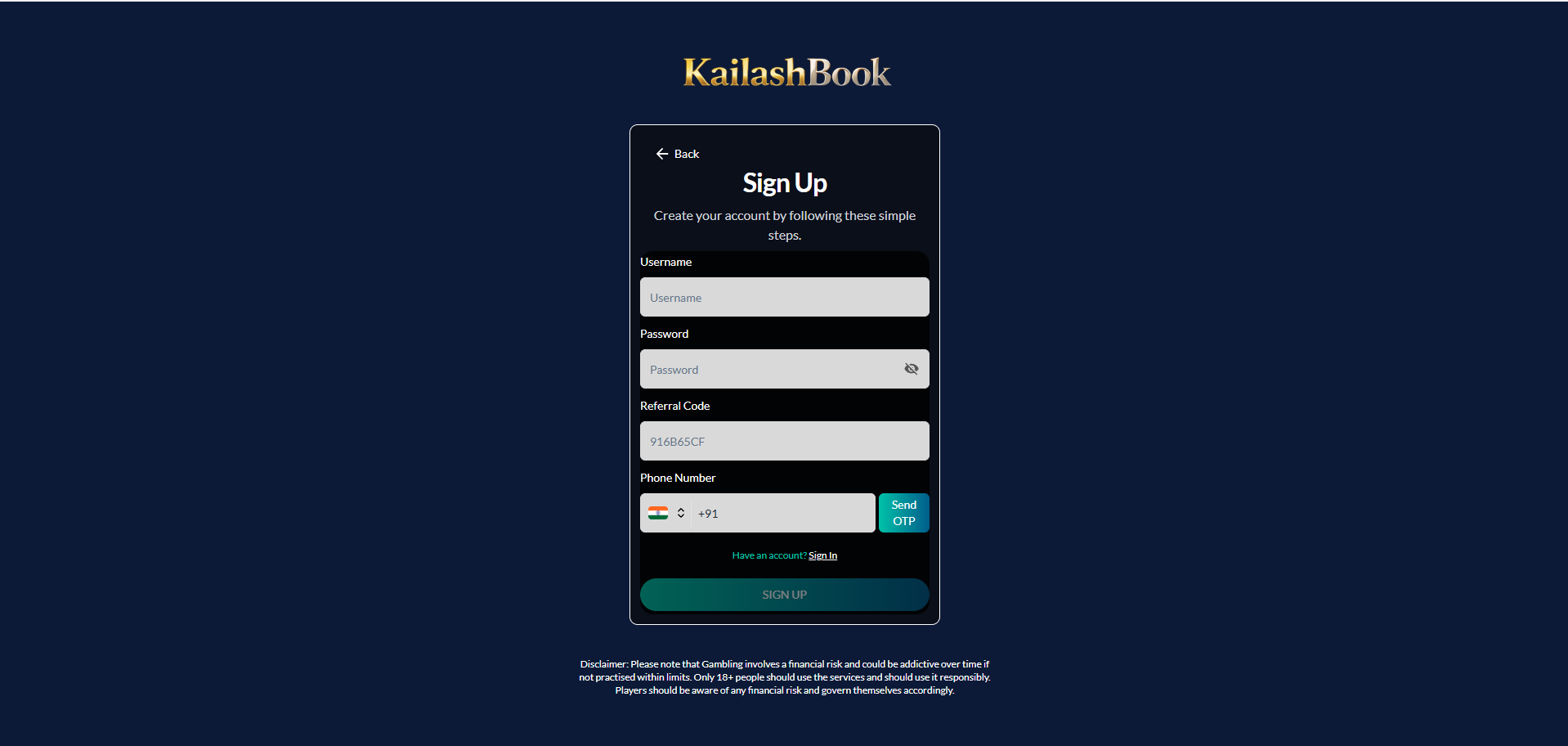
| Username | Included |
| Password (show / hide) | Included |
| Referral Code (pre-fillable via link) | Optional |
| Phone Number with country code (+91 default) | Included |
| Send OTP | Included |
| Sign Up button, Sign In redirect, Back button | Included |
| 18+ / responsible-gambling disclaimer | Included |
Not included
Email Verification Google / Facebook Login KYC Verification
2.2 Sign In
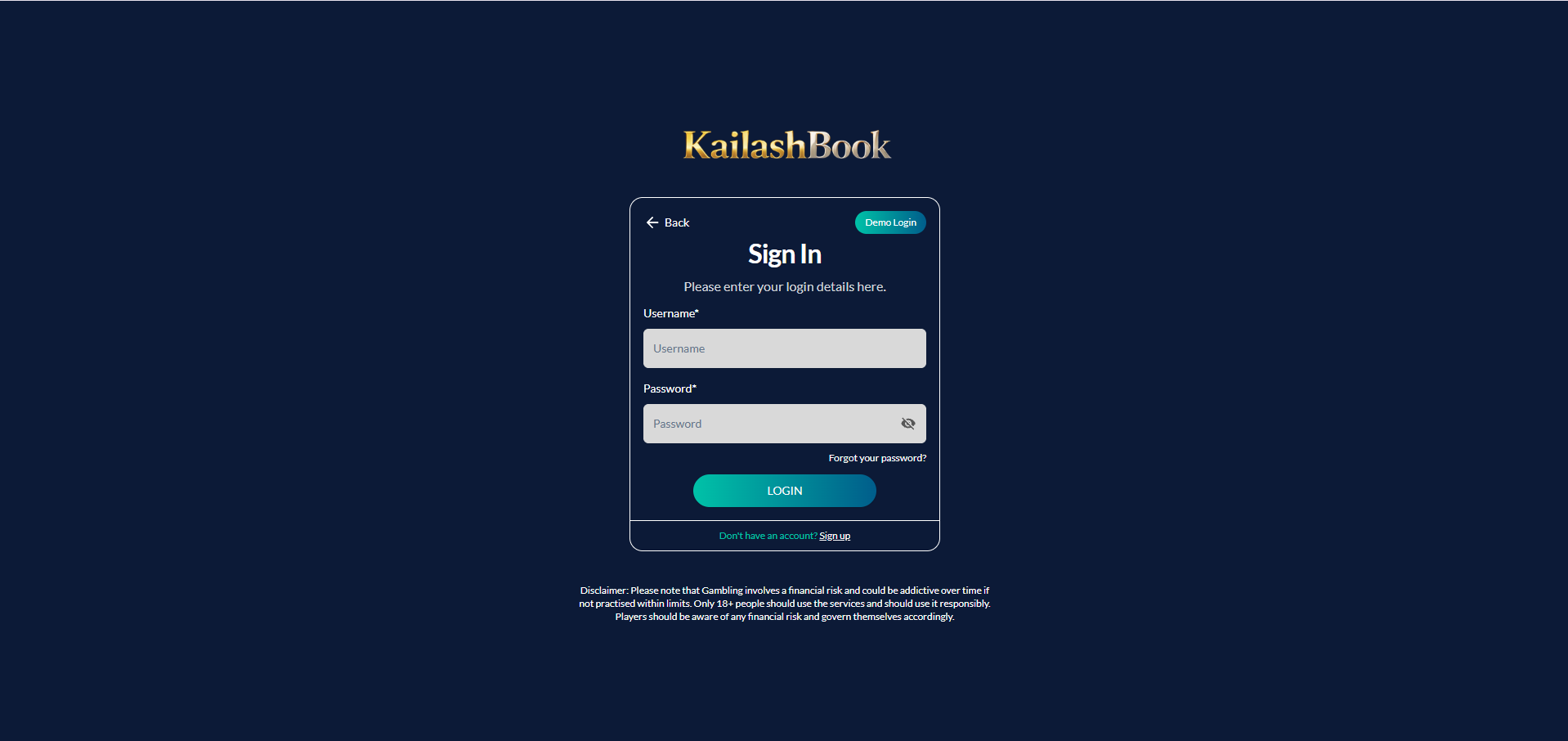
| Username / Password (show / hide) | Included |
| Login button | Included |
| Demo Login button | Included |
| "Forgot your password?" link | Included |
| Sign Up redirect, Back button | Included |
Demo Login
One click gives a visitor a virtual wallet (e.g. Bal: 1000.00) and full browsing/betting access without registering. Demo users cannot deposit, withdraw, update their profile, or earn referral/bonus rewards.

2.3 Forgot Username / Password
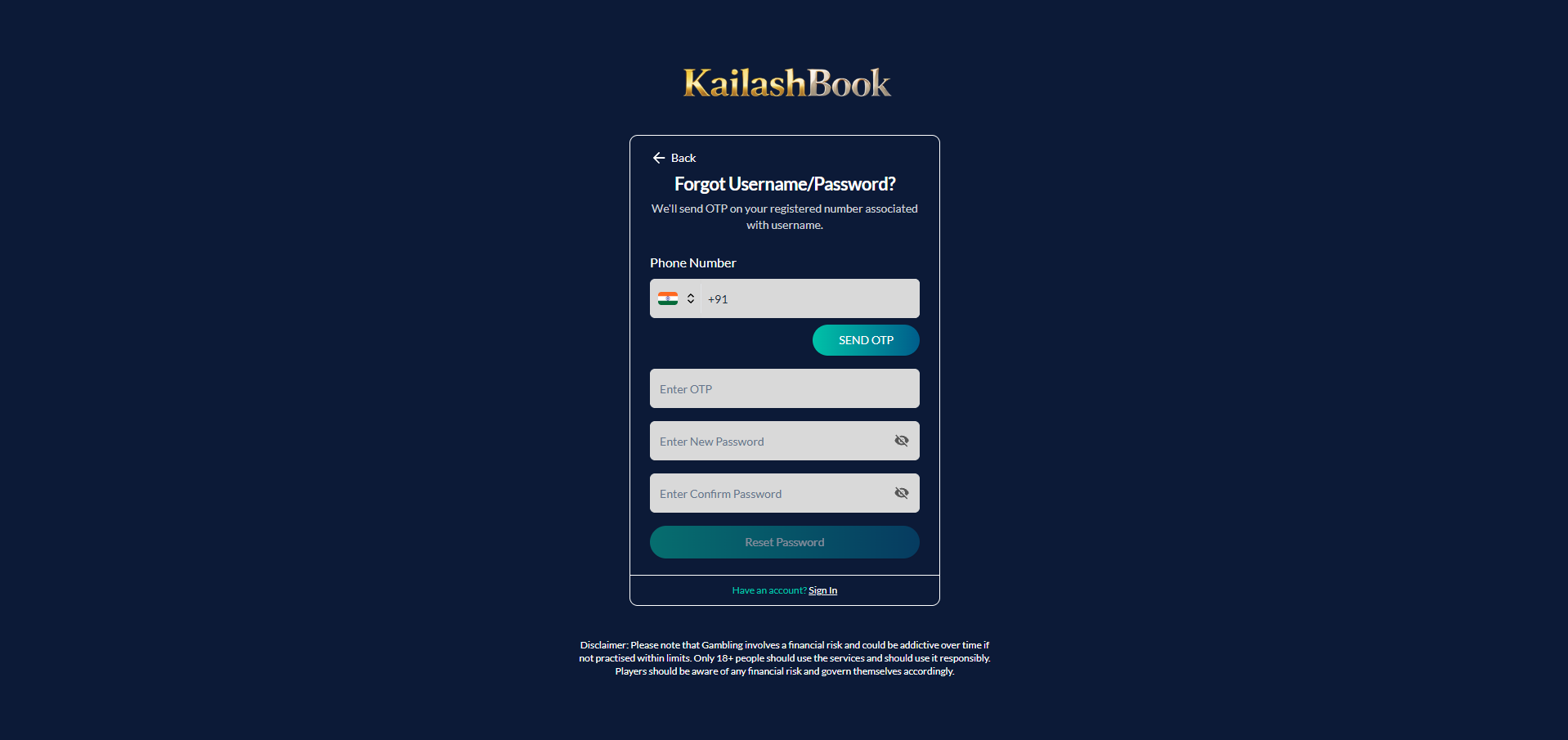
| Phone number with country code | Included |
| Send OTP, Enter OTP | Included |
| New Password / Confirm Password (show / hide) | Included |
| Reset Password button, Sign In redirect | Included |
Validation & error scenarios
- Username and phone number must be unique at Sign Up.
- OTP must be valid and unexpired; invalid credentials, disabled accounts, and phone-not-registered all show a direct error.
- New password and confirm password must match on reset.
Module 03
Header
›
A sticky top bar carries the wordmark, primary navigation, support access, and — once logged in — the wallet summary.

| Component | Description |
|---|---|
| KailashBook wordmark | Redirects to Home |
| Home / Inplay / Cricket / Football / Tennis / Kabaddi / Casino | Primary navigation tabs, active tab highlighted |
| WhatsApp icon | Opens support chat |
| Bal (Balance) | Current available wallet balance |
| Username | Displays logged-in user, links to My Profile |
| Exp (Exposure) | Amount currently locked in open/unmatched bets |
| Bonus Bal | Bonus wallet balance |
Business rules
- Balance, exposure and bonus balance refresh immediately after every bet, settlement, deposit or withdrawal.
- Header remains sticky across all inner pages.
- Guest (logged-out) header shows Login and Signup buttons in place of the wallet block.
Module 04
Sidebar & Navigation
›
A persistent left sidebar lists every sport and every account/wallet destination, and scrolls independently of the main content.

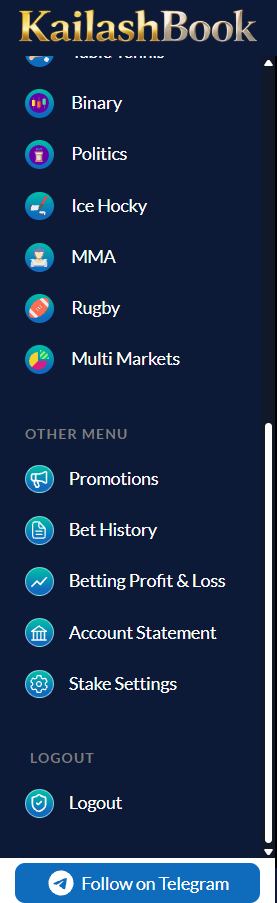
Sports
| Cricket, Football, Tennis, Kabaddi Live | Opens sport-specific listing with real, live markets |
| Basketball, Baseball, Greyhound Racing, Horse Racing, Volleyball, Darts, Futsal, Table Tennis, Binary, Politics, Ice Hockey, MMA, Rugby, Multi Markets Static | Listed for future expansion; static placeholder listing only, no live odds |
Other Menu
| Promotions | Promotional offers |
| Bet History | Sports betting history |
| Betting Profit & Loss | Market-wise P/L report |
| Account Statement | Full wallet ledger |
| Stake Settings | Custom quick-stake buttons |
| Logout | End session |
Logged-in sidebar also adds Deposit, Withdraw, Casino Bet History, Bonus Statement, Referral and My Profile (hidden for demo users).
Business rules
- Active sport / page is highlighted in the sidebar.
- Sidebar scrolls independently; a "Follow on Telegram" button is pinned to the bottom at all times.
- Account/wallet items (Deposit, Withdraw, Bonus Statement, Referral, My Profile) are hidden or disabled for demo users.
Module 05
Home Dashboard
›
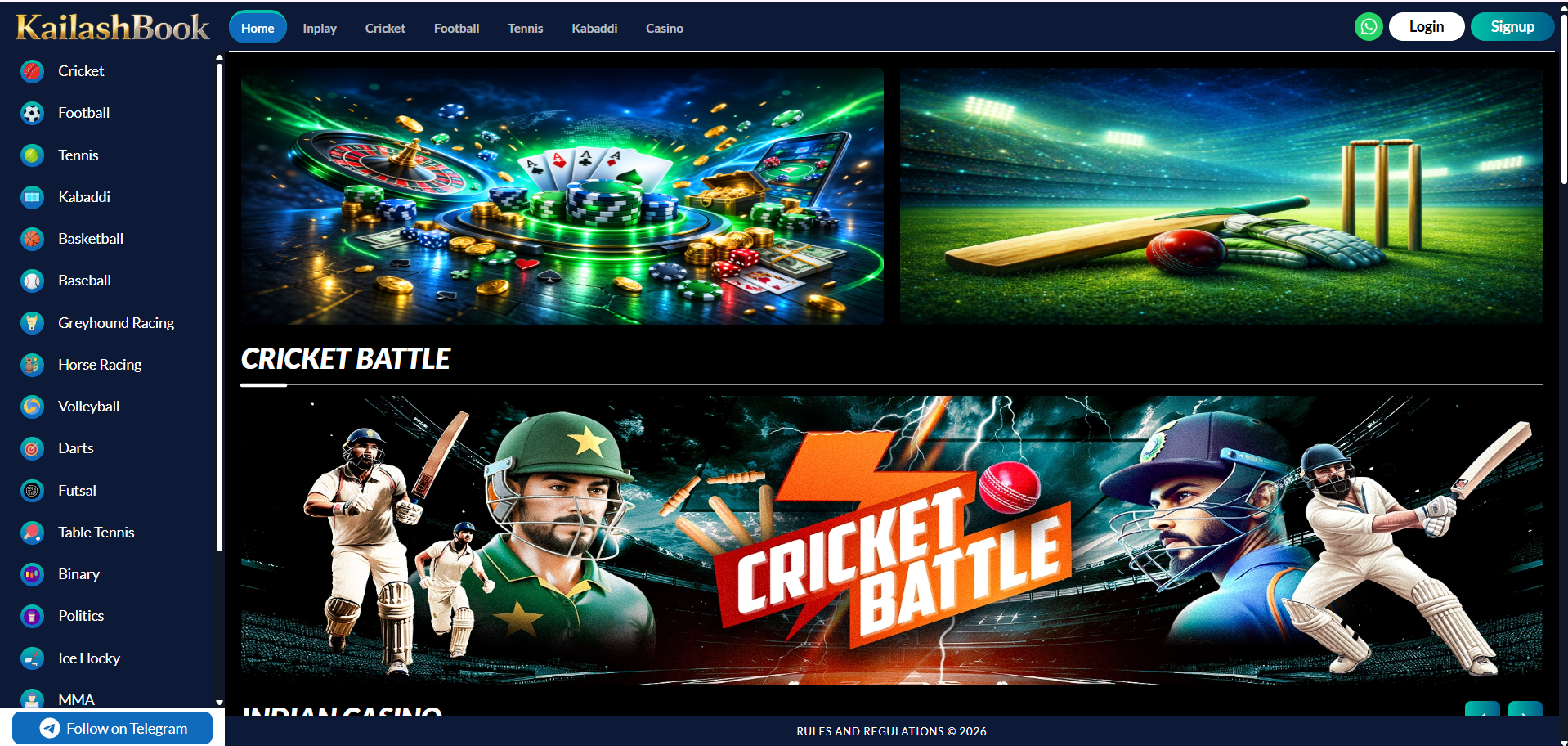
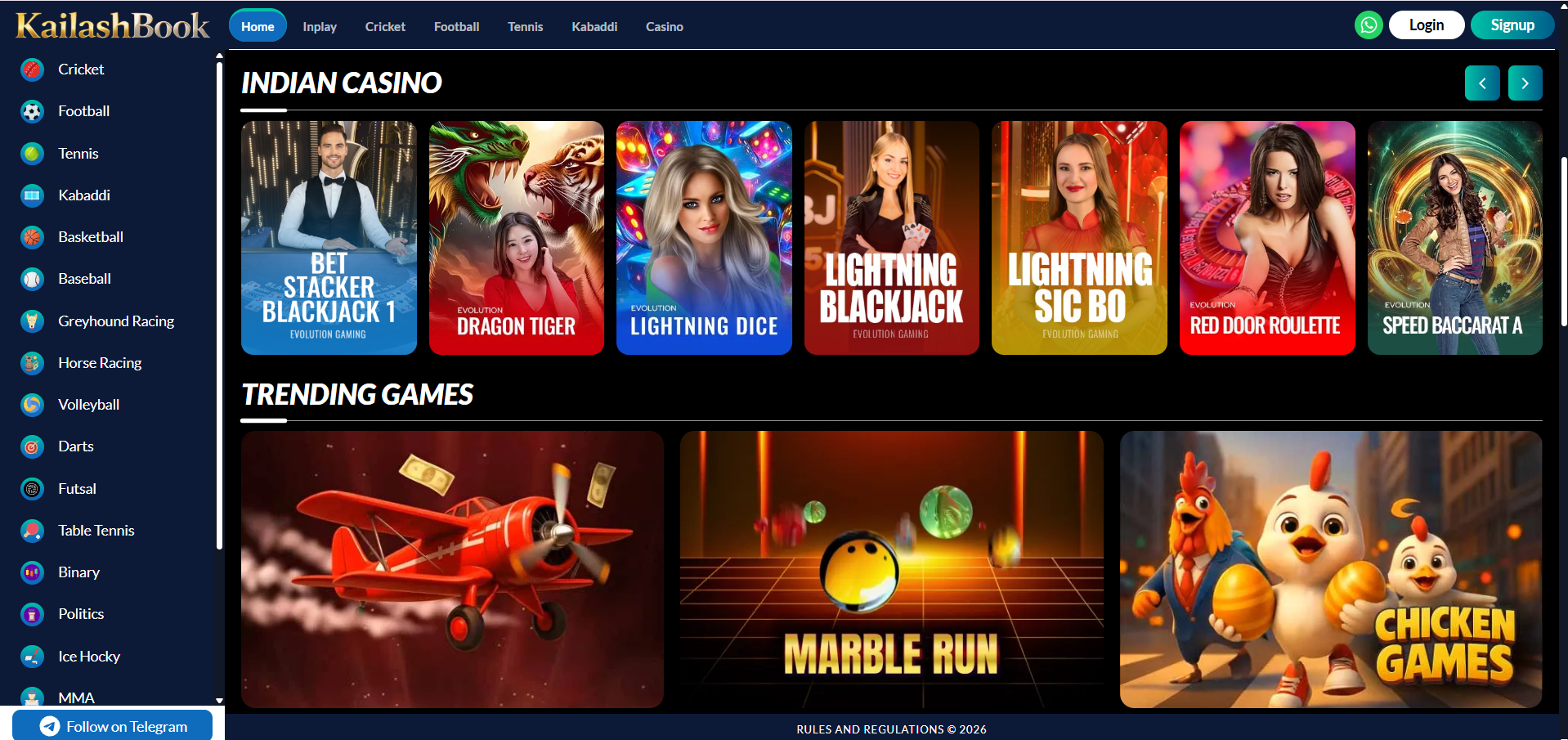
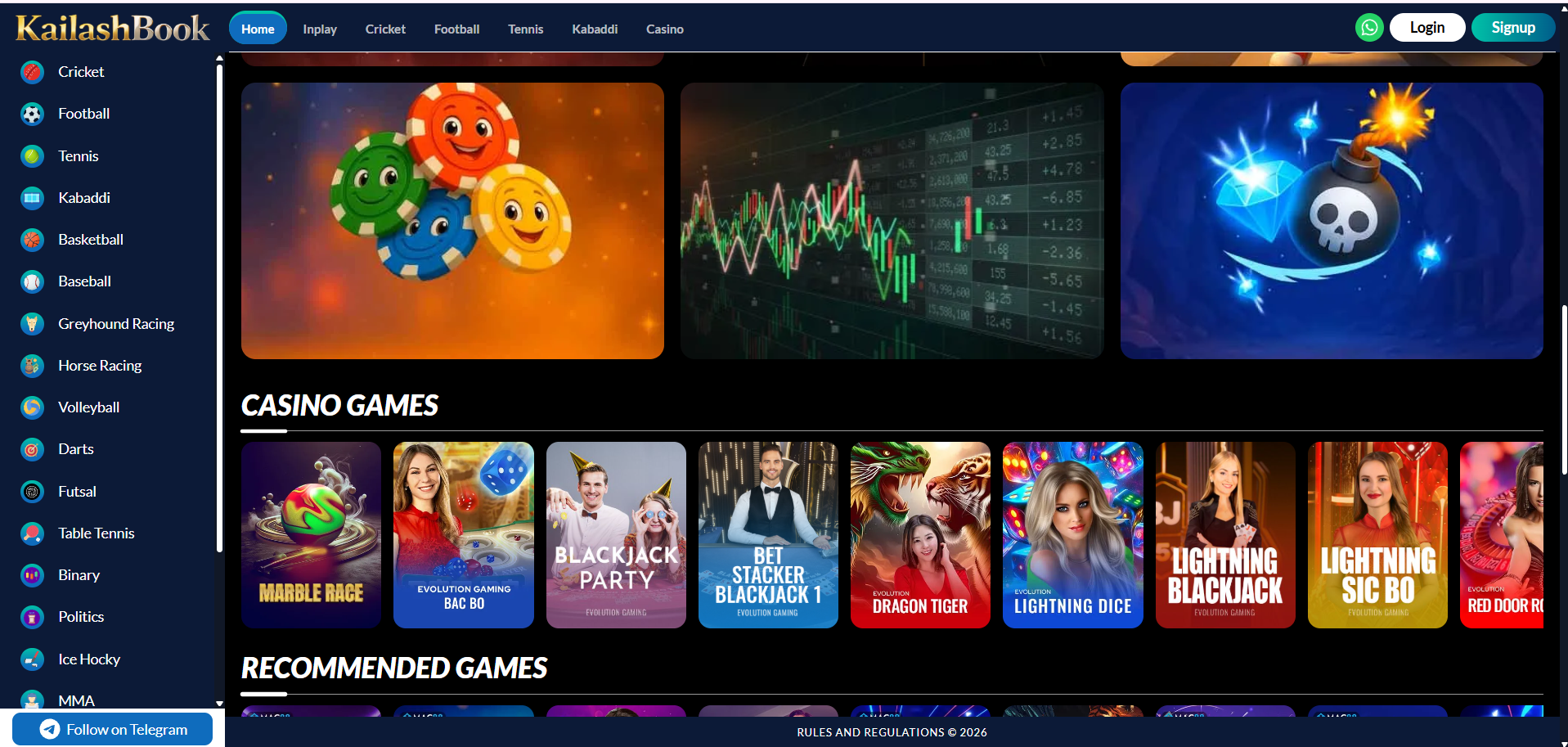
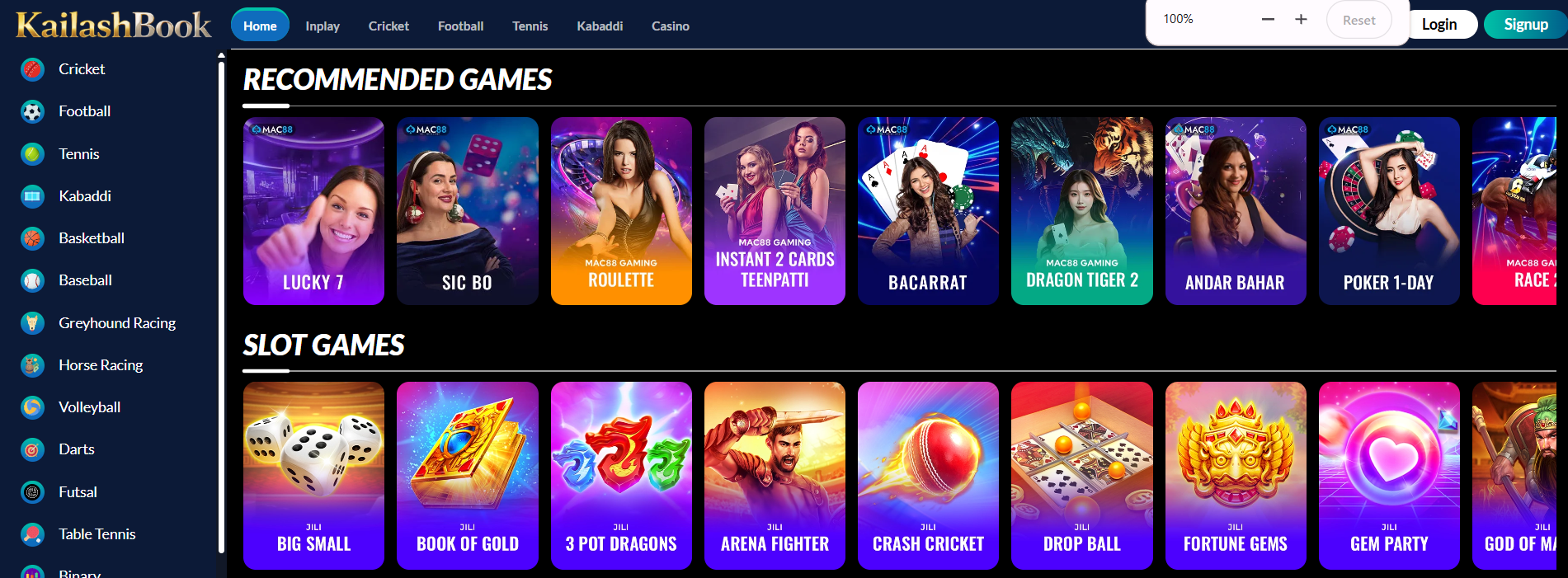
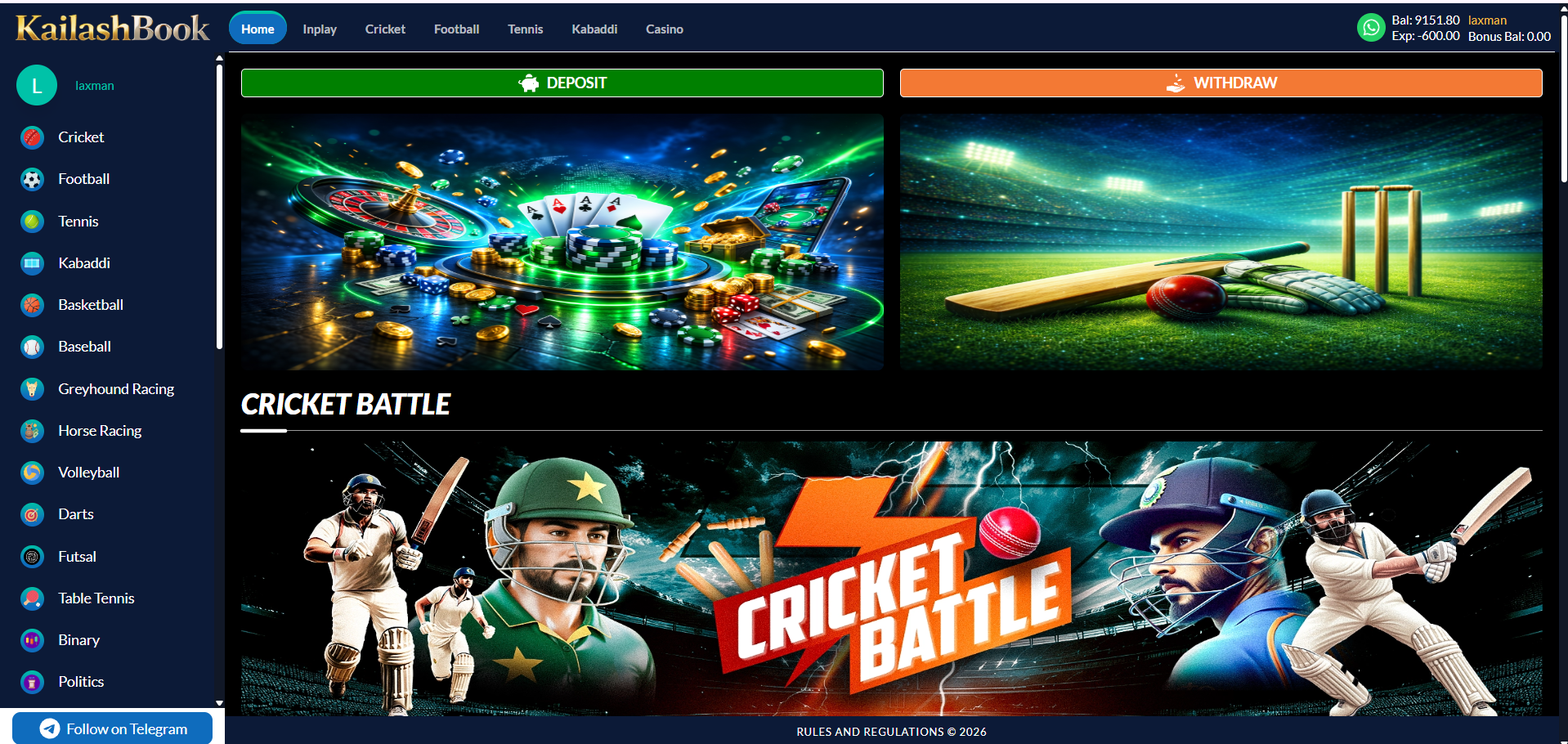
The landing page after Age Verification (guest) or login. Surfaces promotional banners, casino highlights, trending games, and quick access to wallet actions.
Features included
| Section | Description |
|---|---|
| Deposit / Withdraw bar | Full-width shortcut buttons above the banners (logged-in view only) |
| Hero banners | Two full-width promotional banners, each with a CTA |
| Cricket Battle strip | Large secondary promotional banner |
| Indian Casino | Horizontally scrollable row of Indian-market table games with paging arrows |
| Trending Games | 3-up row of currently trending casino titles |
| Casino Games | Wide provider-mixed row (Evolution, MAC88, etc.) |
| Recommended Games / Slot Games | Personalised and slot-only rows |
| Support strip & footer | WhatsApp support banner, platform description, About / Rejection & Decline / Responsible Gaming / Terms & Conditions links |
Business rules
- Balance, exposure and bonus balance refresh immediately after every bet, settlement, deposit or withdrawal.
- Guest (not-logged-in) header shows Login / Signup in place of the Deposit/Withdraw bar and wallet block.
- Banner and game-tile click-through is configured from the Admin Panel.
- Footer: "© Copyright 2024. All Rights Reserved. Powered by KailashBook." with a sticky "RULES AND REGULATIONS © 2026" bar.
Module 06
Casino
›
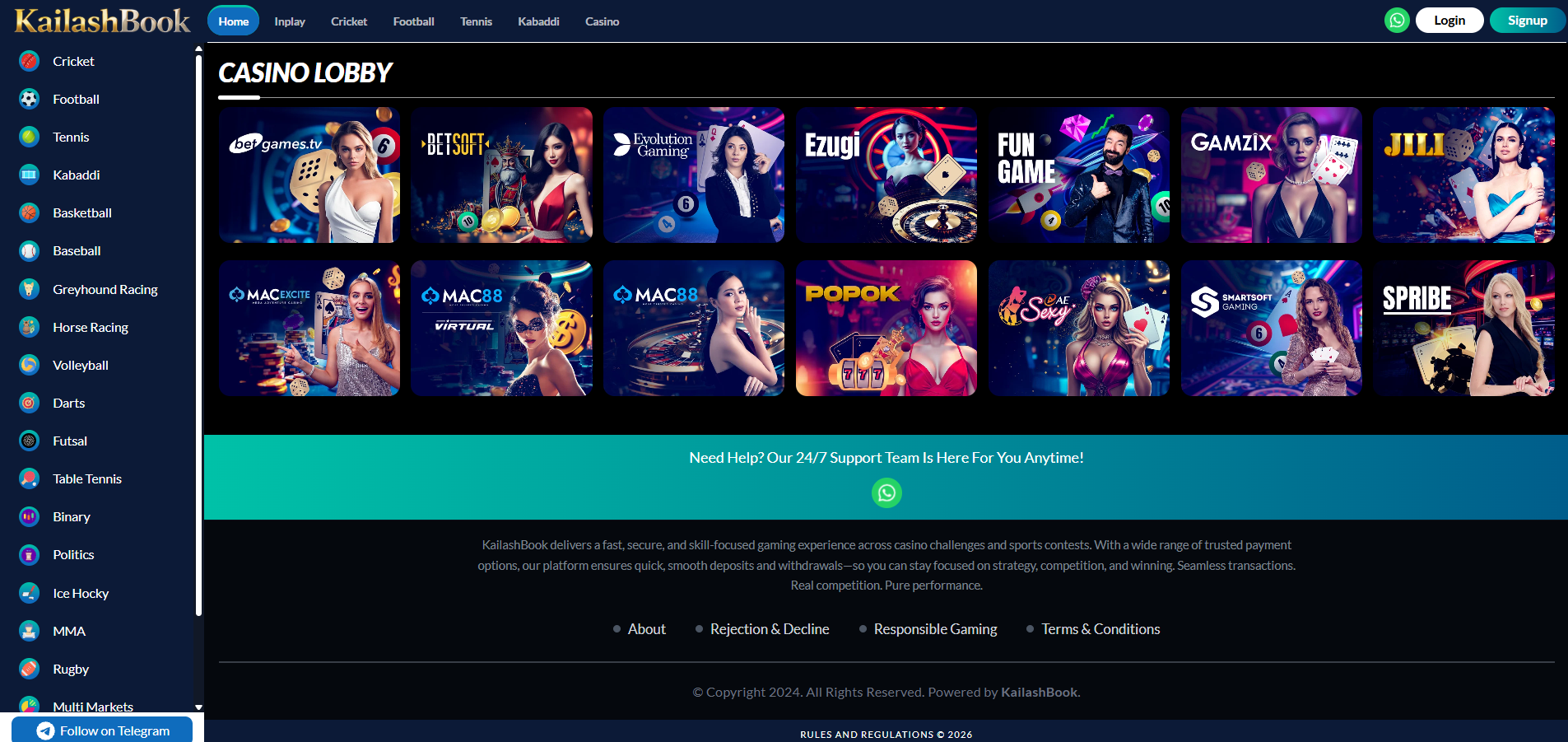
Casino is fully in scope. Clicking "Casino" in the header opens the full Casino Lobby — every provider and game category in one searchable grid — in addition to the curated rows already on Home.
Features included
| Home rows: Indian Casino, Trending, Casino Games, Recommended, Slot Games | Included |
| Casino Lobby page (Header → Casino) | Included |
| Provider tile grid (betgames.tv, BetSoft, Evolution Gaming, Ezugi, FunGame, Gamzix, JILI, MAC Excite, MAC88 Virtual, MAC88, POPOK, AE Sexy, SmartSoft, Spribe) | Included |
| Game launch in new session / iframe | Included |
Business rules
- Game tiles are provider-fed; thumbnails, titles and availability are managed by each provider's integration.
- Balance deducted/credited by the casino provider is reflected instantly in the header wallet.
- Casino bets settle into Casino Bet History (Module 15) and Betting Profit & Loss's Casino tab, separate from sports bets.
Module 07
In-Play Events Listing
›
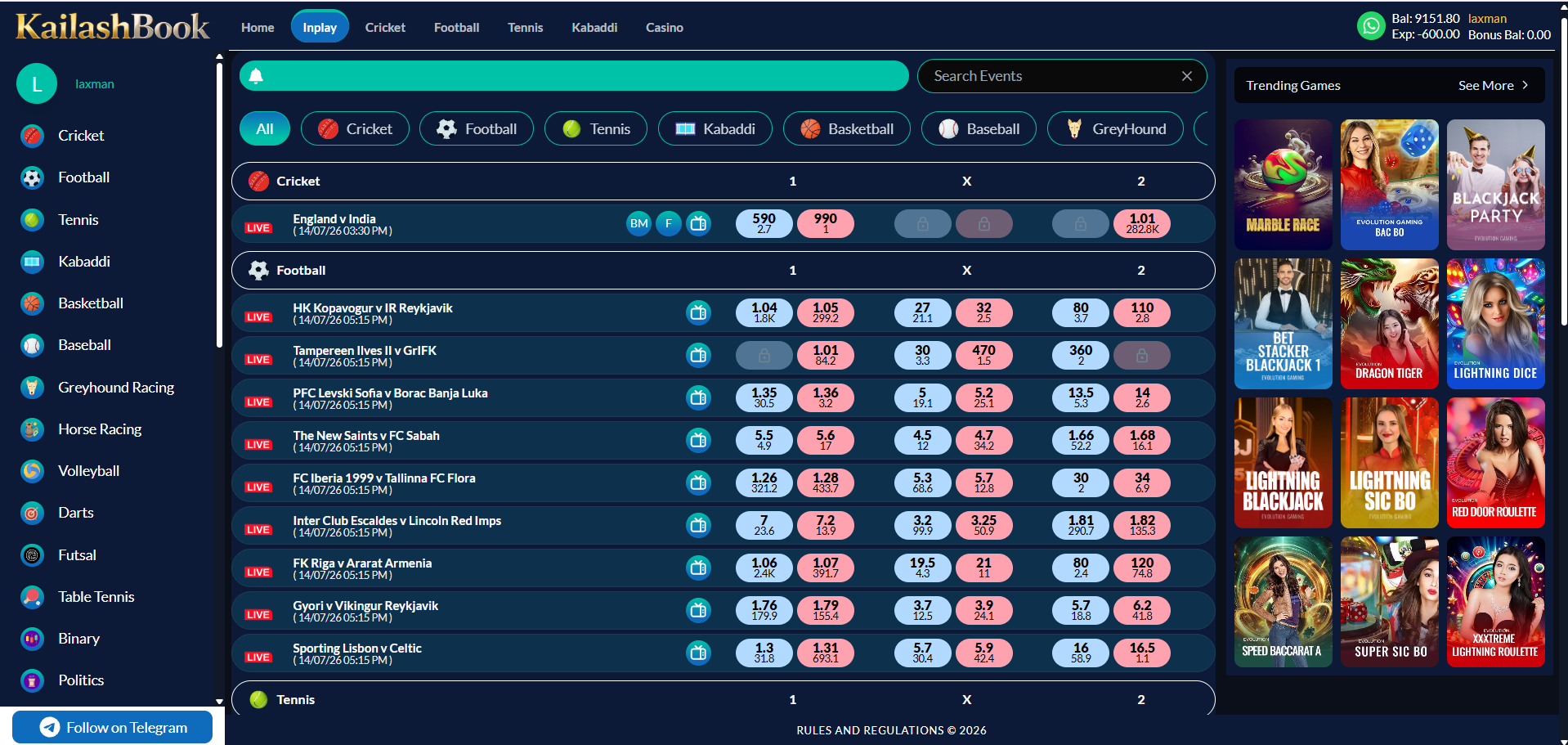
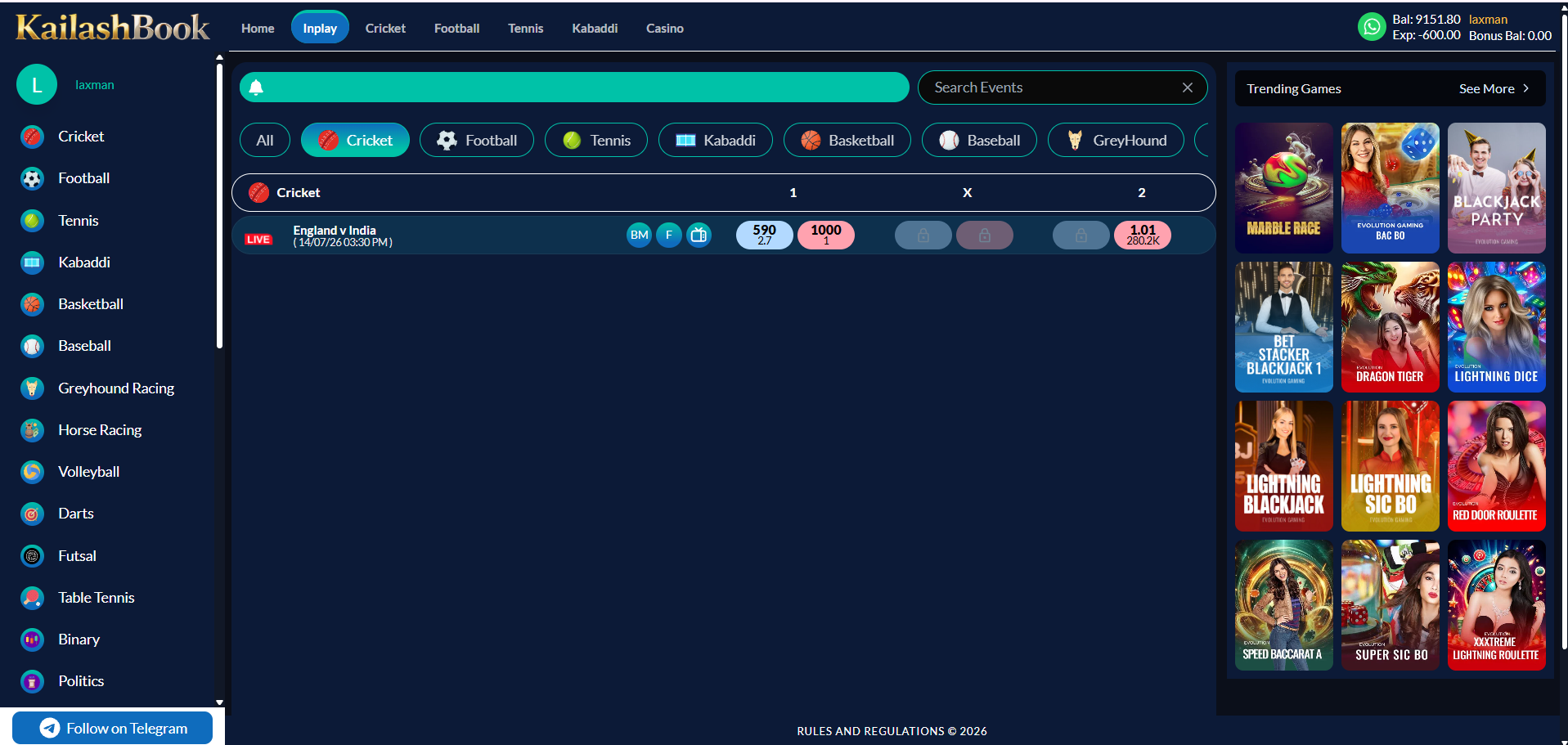
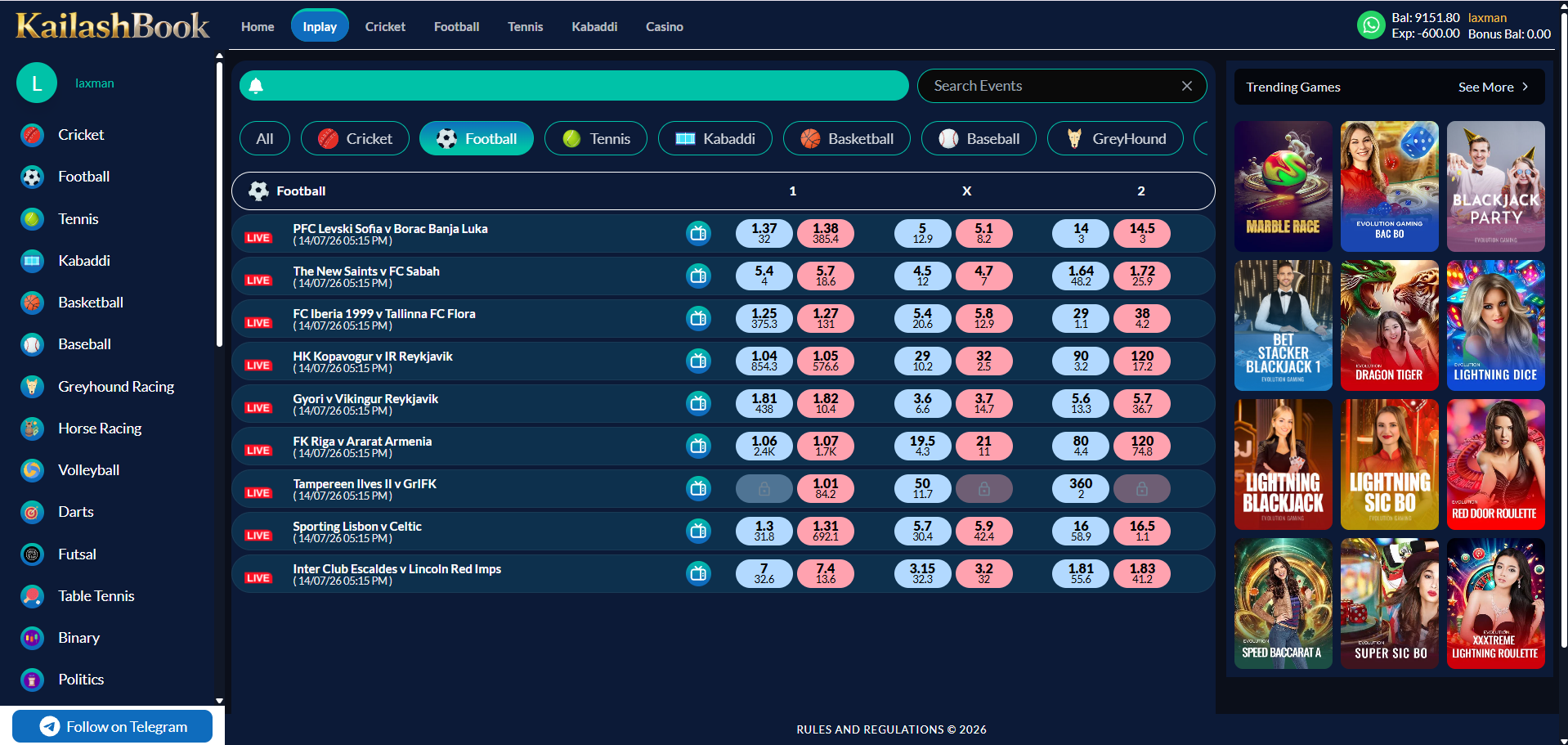
Lists every sport currently live with a sport filter row and search box. Selecting a filter narrows the list to that sport's live matches.
Features included
| Search Events box | Included |
| Sport filter row (All / Cricket / Football / Tennis / Kabaddi / Basketball / Baseball / GreyHound …) | Included |
| Per-sport event rows with LIVE tag, market shortcuts, BM/F badges | Included |
| Back / Lay odds with volume beneath each price | Included |
| Locked (suspended) selection indicator | Included |
| Trending Games rail (right column) | Included |
Business rules
- All filter chips are visible per Module 04's scope note, but only Cricket, Football, Tennis and Kabaddi return live rows; other filters show an empty state.
- Odds and volumes update live without a page reload; suspended markets show a lock icon and are not clickable.
- Tapping a market price opens the Bet Slip pre-filled with that selection.
Module 08
Sport Listing Pages
›
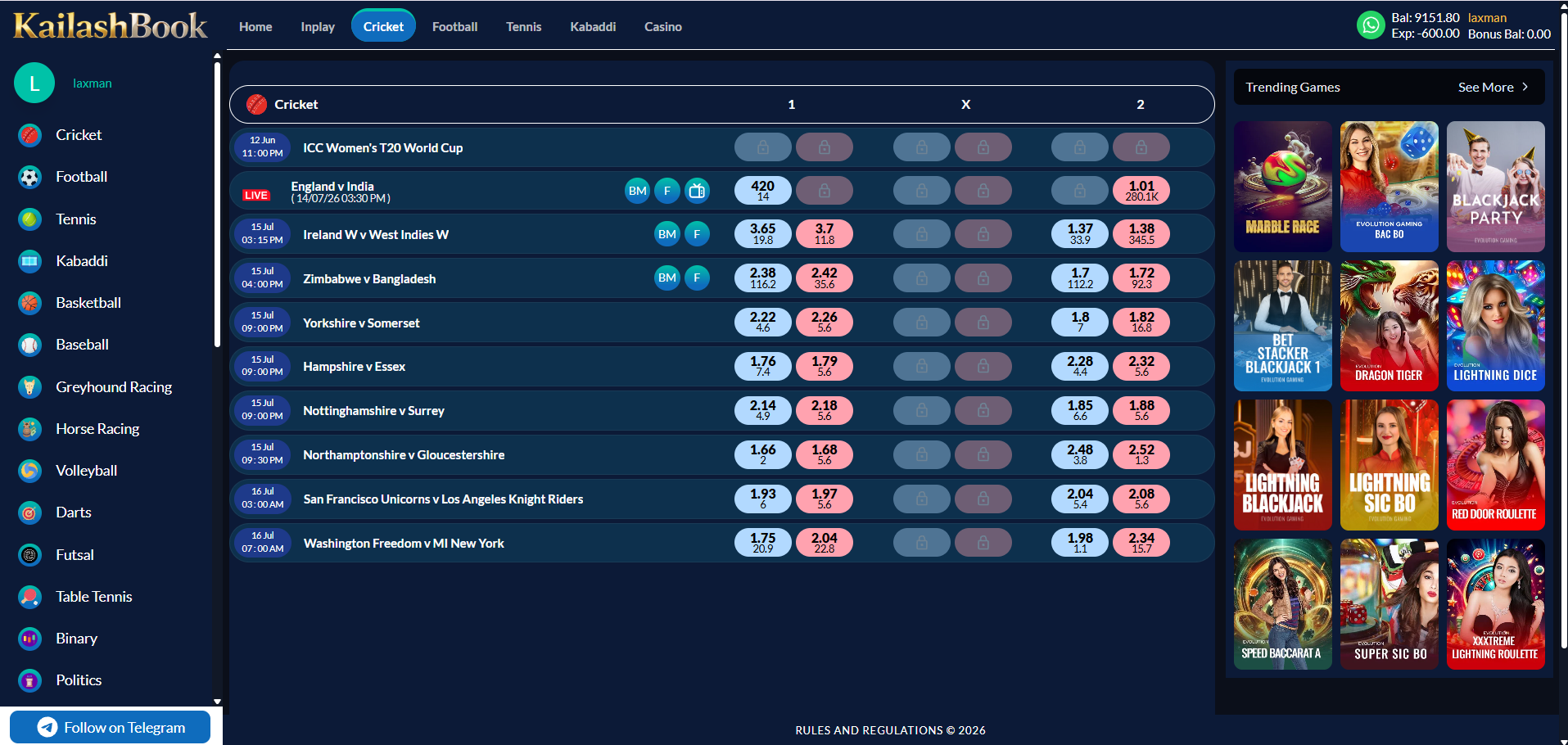
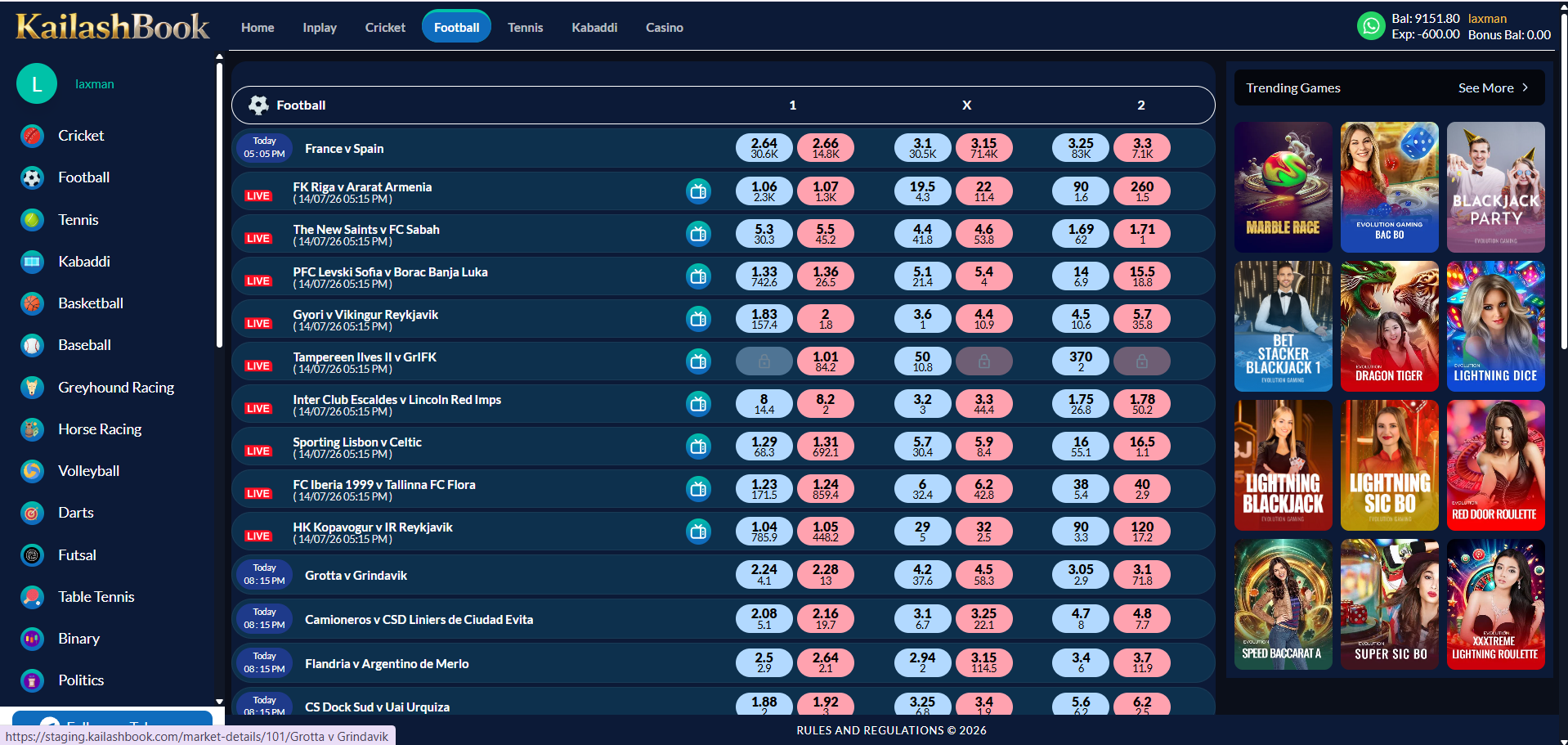
A shared template lists all upcoming and live matches for the selected sport with 1 / X / 2 odds. Tennis and Kabaddi reuse the identical structure shown here for Cricket and Football.
Features included
| Match rows: date/time, teams, 1 / X / 2 back-lay pairs with volume | Included |
| LIVE tag on in-progress matches, BM / F badges | Included |
| Trending Games rail (right column) | Included |
Business rules
- Sports without a Draw market (e.g. Cricket) omit the "X" column.
- Matches are sorted by start time, live matches surfaced first.
- Clicking a match row opens its Sports Betting Market page (Module 09).
Module 09
Sports Betting Market (Inside Event)
›
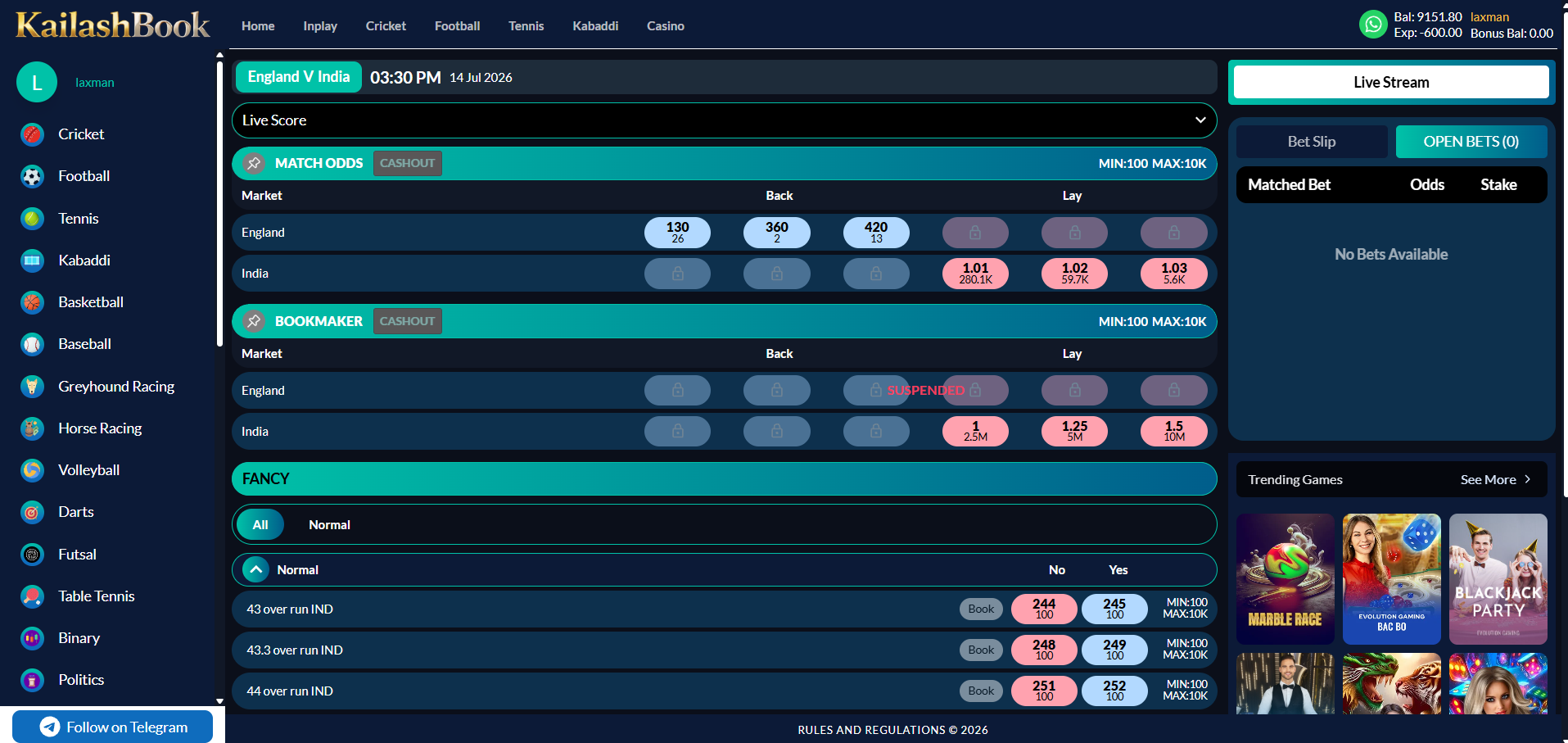
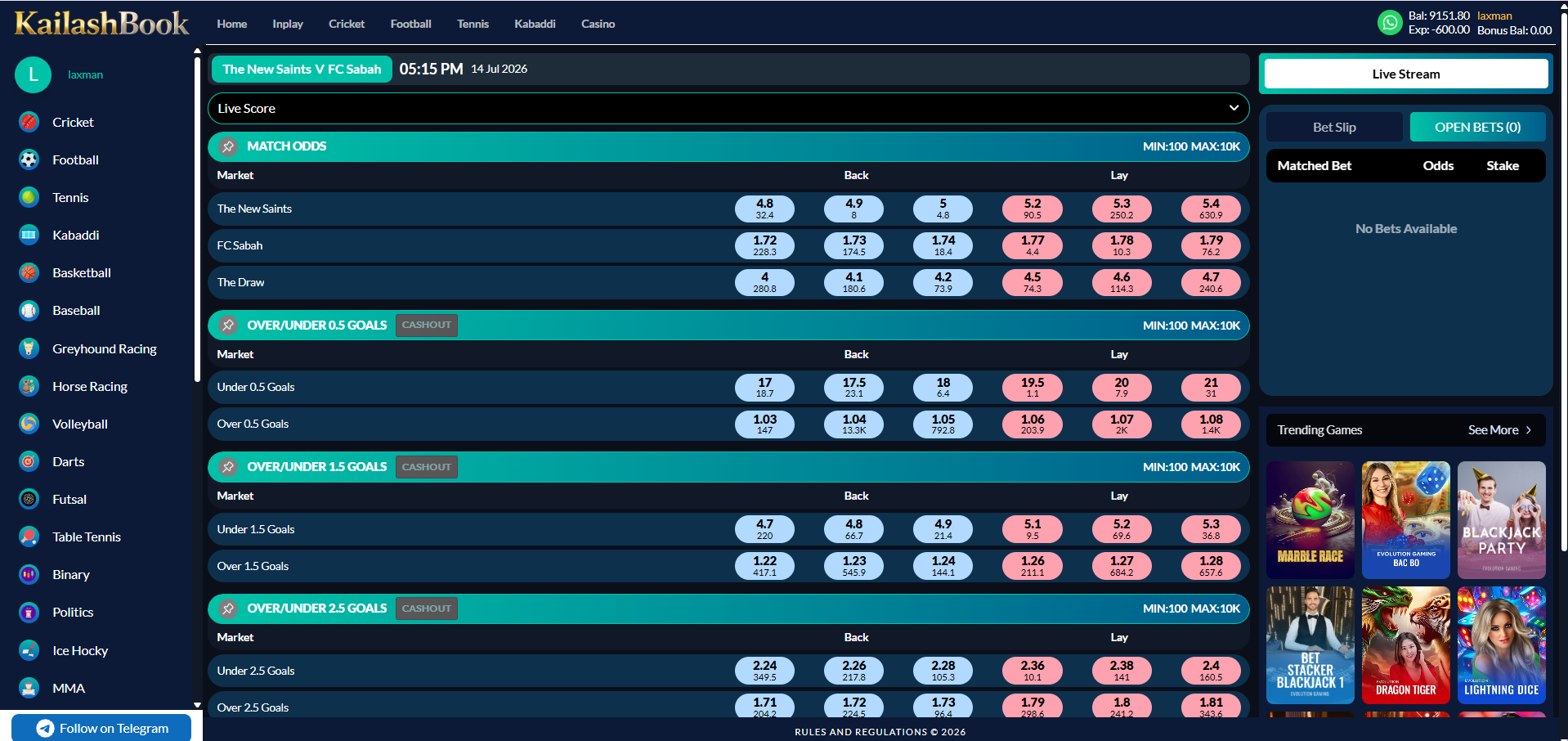
The inner market page for a selected match shows every available market plus a live stream slot and the persistent Bet Slip / Open Bets panel. Cricket and Football are shown below; Tennis and Kabaddi reuse the same shell.
Features included
| Match header (teams, time, date) + Live Score dropdown | Included |
| Live Stream panel | Included |
| Match Odds market with Cashout tag, Min/Max stake | Included |
| Cricket: Bookmaker market + Fancy market (All / Normal filter, Yes/No pricing, Book action) | Included |
| Football: Over/Under Goals markets (0.5 / 1.5 / 2.5 …) with Cashout | Included |
| Bet Slip / Open Bets tab switcher (right column) | Included |
| Back (blue) / Lay (pink) price pairs with 3-deep depth and volume | Included |
Business rules
- Odds are pushed live and update without a page reload; suspended selections show a lock icon and cannot be booked.
- Each market enforces its own Min/Max stake, shown in the market header.
- Tapping a price opens the Bet Slip pre-filled with that selection and odds (Module 10).
- Market set differs per sport (Bookmaker/Fancy for Cricket, Over/Under Goals lines for Football); Tennis and Kabaddi use the market types applicable to each sport.
Module 10
Bet Slip & Open Bets
›
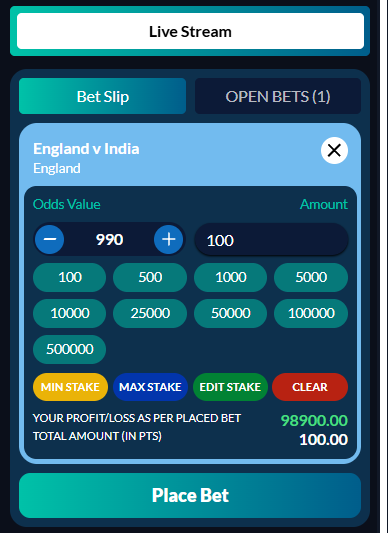
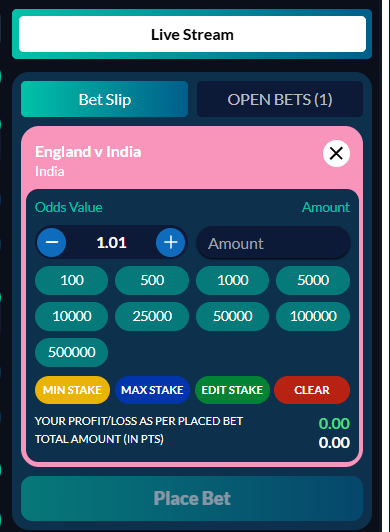
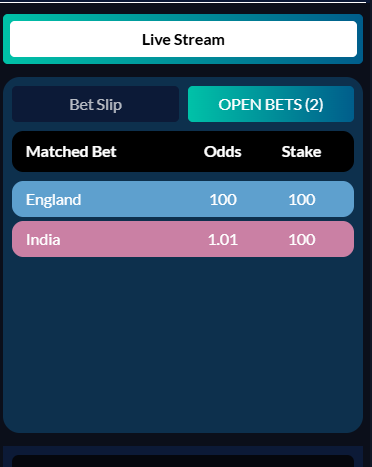
A fixed panel beside every market lets the user stake a tapped selection and review currently matched bets, without leaving the page.
Features included
| Selected runner / outcome name, odds value stepper (+ / −), amount field | Included |
| Quick-stake chips (100, 500, 1000, 5000, 10000, 25000, 50000, 100000, 500000) | Included |
| Min Stake / Max Stake / Edit Stake / Clear buttons | Included |
| Live Profit/Loss and Total Amount preview | Included |
| Place Bet button | Included |
| Open Bets tab — Matched Bet / Odds / Stake table | Included |
Business rules
- Stake must be within the selected market's Min/Max limits.
- Odds can move between selection and placement; the platform re-confirms if the price has drifted beyond tolerance.
- Placing a bet immediately reduces available balance and increases exposure in the header.
- Open Bets shows only currently matched, unsettled bets for the open market.
Module 11
Promotions
›
Lists active promotional campaigns as banner cards; each opens a detail page with the full offer description.
Features included
| Promotion banner grid | Included |
| Title strip per banner | Included |
| Detail page (banner + title + description) | Included |
| Back navigation | Included |
Business rules
- Promotions are managed and ordered from the Admin Panel.
- Admin-configurable: only promotions the admin has marked Active are listed; the admin toggles a promotion Active/Inactive to show or hide it.
Module 12
Manual Deposit
›
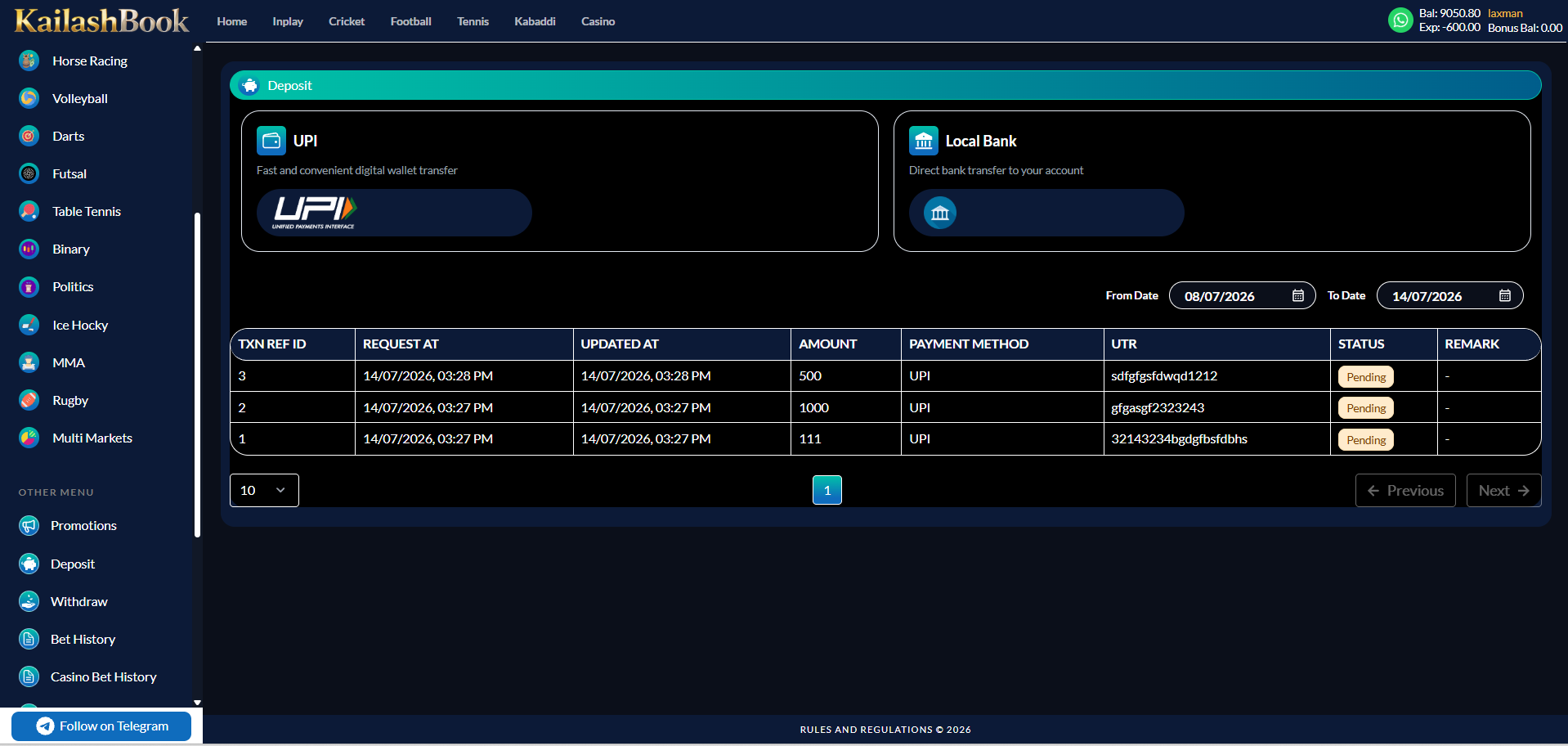
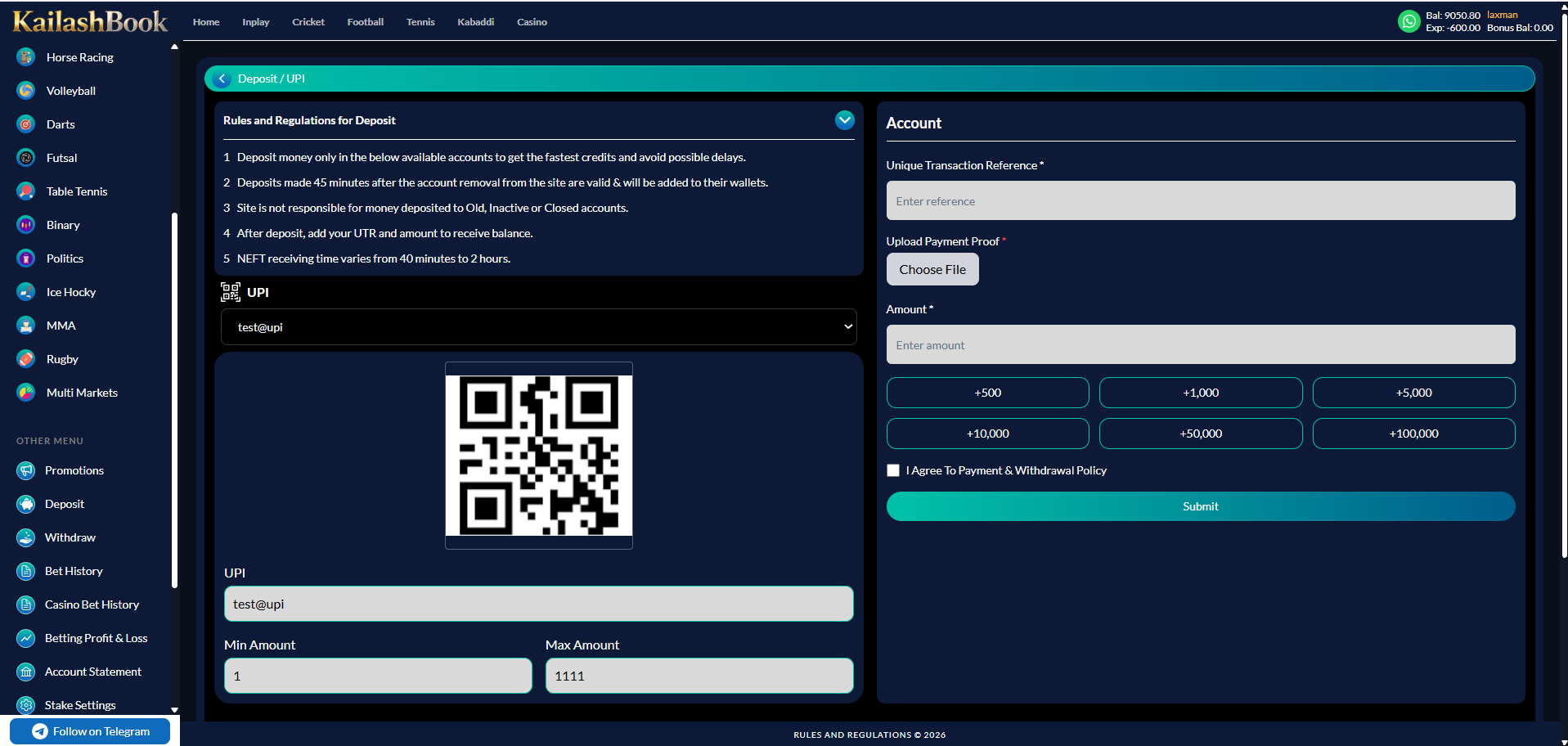
Users fund their wallet manually via UPI or bank transfer, then submit proof of payment for admin approval.

Features included
| UPI method (QR + UPI ID) | Included |
| Local Bank method (bank name, A/C holder, IFSC, A/C no., type) | Included |
| Rules and Regulations for Deposit (collapsible) | Included |
| Unique Transaction Reference field, Upload Payment Proof | Included |
| Amount field + quick-amount chips (+500 … +100,000) | Included |
| "I Agree To Payment & Withdrawal Policy" checkbox, Submit | Included |
| Transaction history table with date filter (TXN Ref ID, Request/Updated At, Amount, Payment Method, UTR, Status, Remark) | Included |
Business rules
- Deposit is manual — no payment gateway; admin manually confirms and credits after verifying UTR / proof.
- Agreement checkbox is mandatory before Submit is enabled.
- Each method enforces its own Min/Max amount, shown on the Account panel.
- Transaction history is filterable by From / To date and paginated.
Module 13
Manual Withdrawal
›
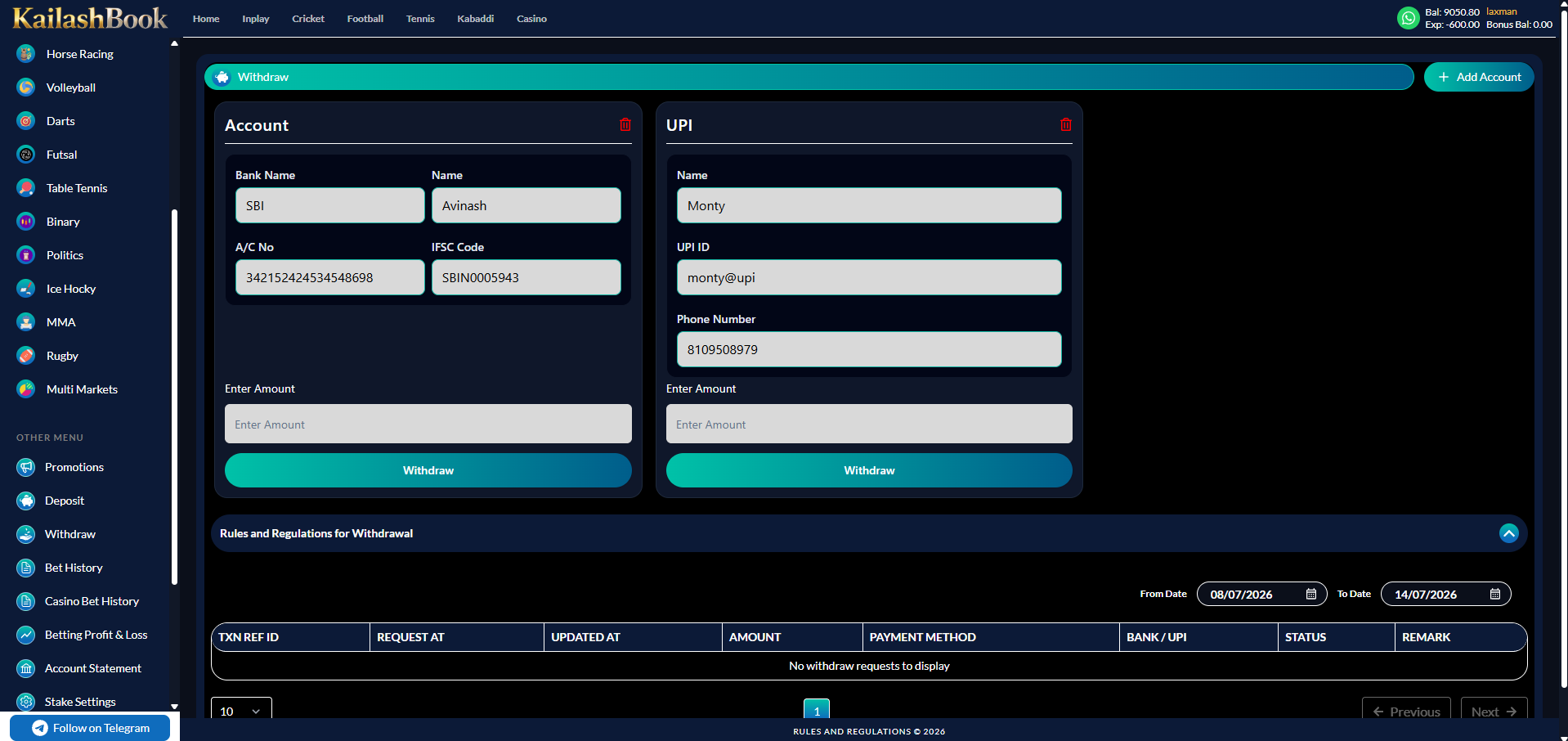
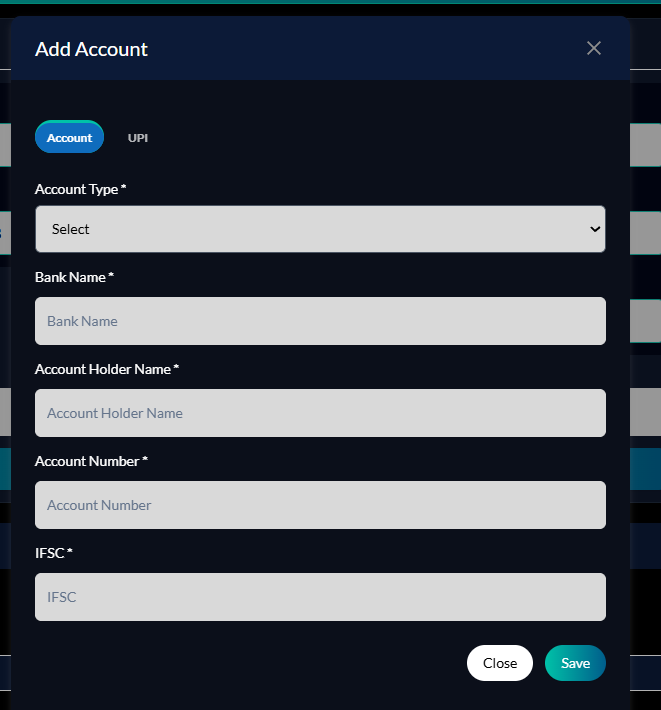
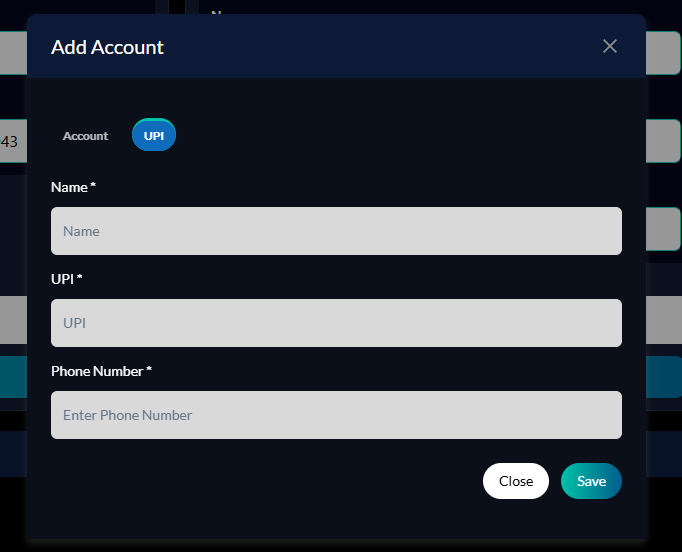
Users save one or more payout accounts (Bank or UPI) and submit a withdrawal request against a saved account.
Features included
| Add Account modal — Account tab (Account Type, Bank Name, Account Holder Name, Account Number, IFSC) | Included |
| Add Account modal — UPI tab (Name, UPI, Phone Number) | Included |
| Saved account card with Enter Amount + Withdraw button | Included |
| Delete saved account | Included |
| Rules and Regulations for Withdrawal (collapsible) | Included |
| Transaction history table with date filter (TXN Ref ID, Request/Updated At, Amount, Payment Method, Bank/UPI, Status, Remark) | Included |
Business rules
- Withdrawal requires at least one saved payout account.
- Requested amount cannot exceed the available (non-exposed) balance.
- Multiple accounts (Bank and/or UPI) can be saved and withdrawn from independently.
- Withdrawal is manual — an admin approves and pays out; no automatic payout gateway.
Module 14
Bet History
›
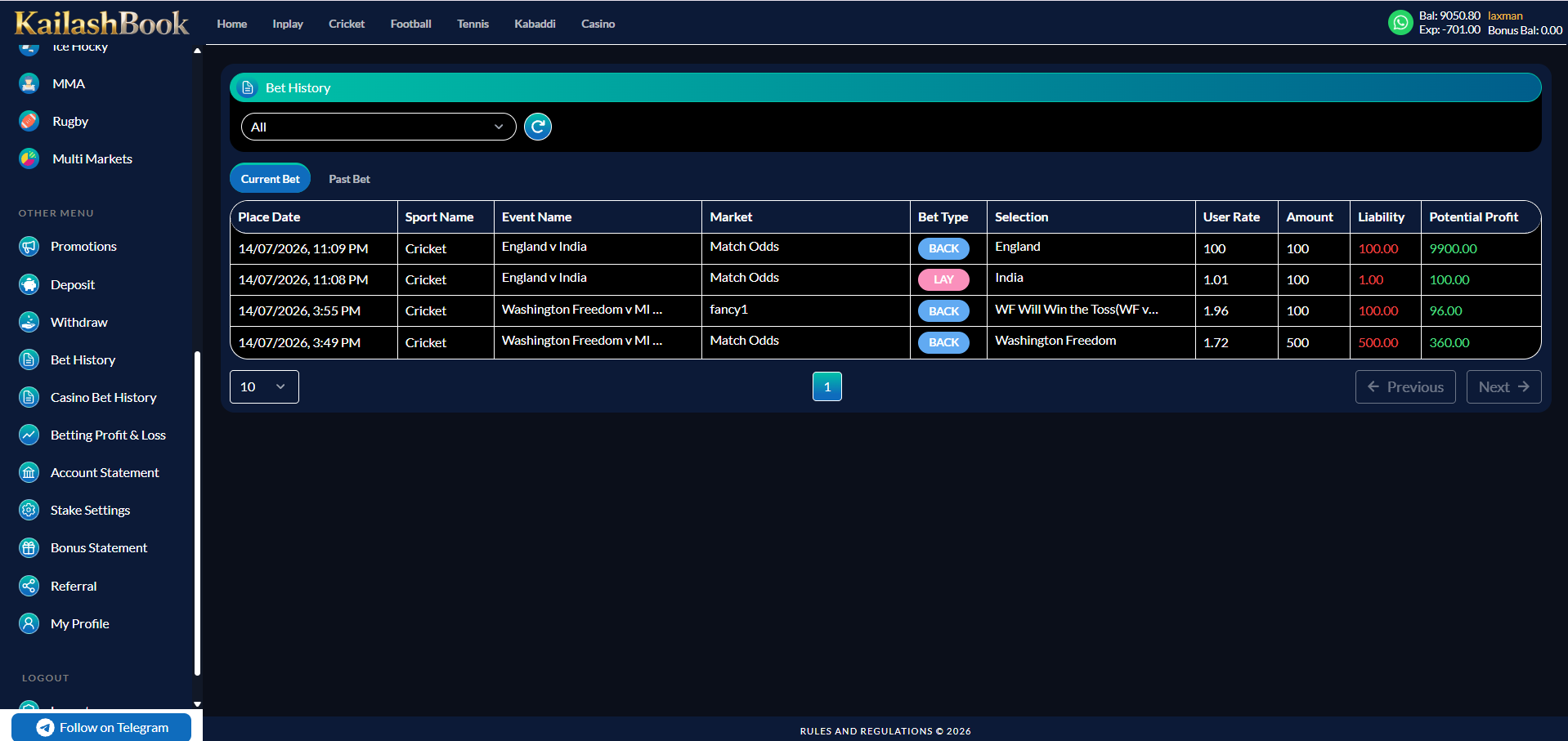
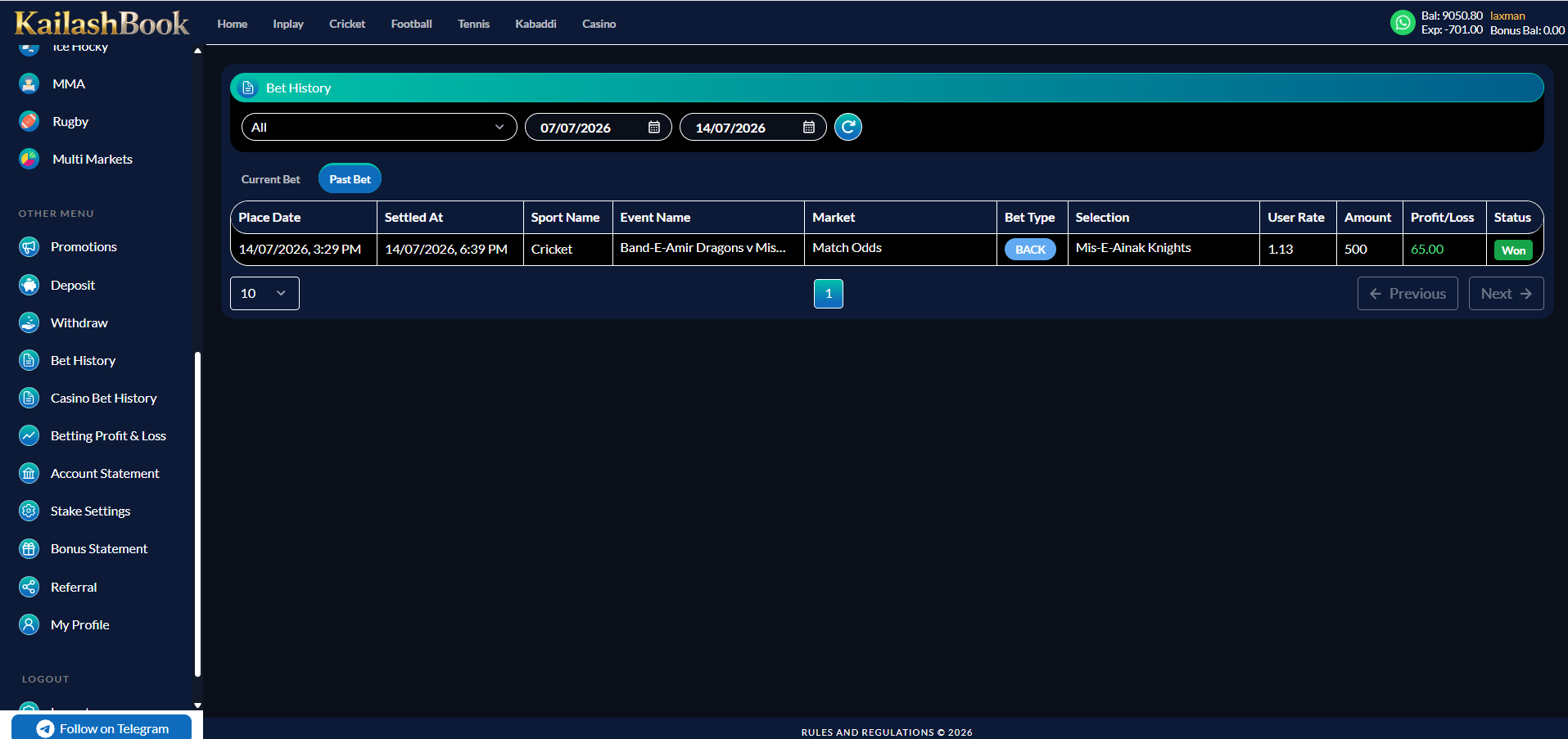
Shows every sports bet the user has placed, split into Current Bet (unsettled) and Past Bet (settled), with a sport filter.
Features included
| Sport filter dropdown ("All" default), Refresh | Included |
| Current Bet / Past Bet tabs | Included |
| Current Bet columns: Place Date, Sport, Event, Market, Bet Type, Selection, User Rate, Amount, Liability, Potential Profit | Included |
| Past Bet columns: adds Settled At, Profit/Loss, Status (Won/Lost) | Included |
| From / To date filter (Past Bet), pagination | Included |
Business rules
- Current Bet shows only matched, unsettled bets; Past Bet shows settled bets with final result.
- Liability and Potential Profit are calculated per bet type (Back vs Lay).
Module 15
Casino Bet History
›
A parallel history to Module 14, scoped to casino-provider rounds instead of sports markets.
Features included
| From / To date filter + refresh | Included |
| Columns: Game Name, Game Round ID, Transaction ID, Bet ID, Bet Amount, P/L, Bet Outcome, Date/Time | Included |
| Pagination | Included |
| "No casino bet history found" empty state | Included |
Module 16
Betting Profit & Loss
›
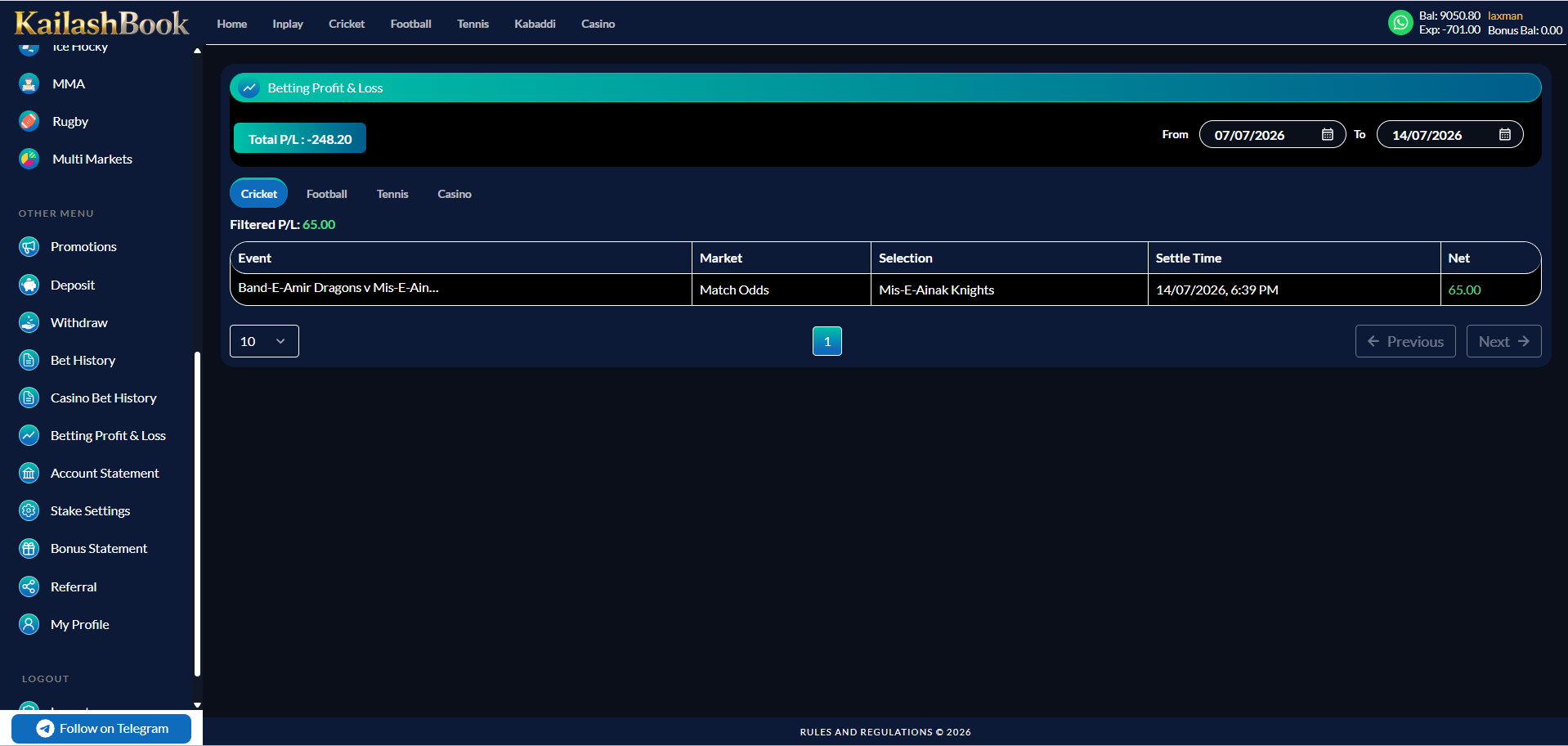
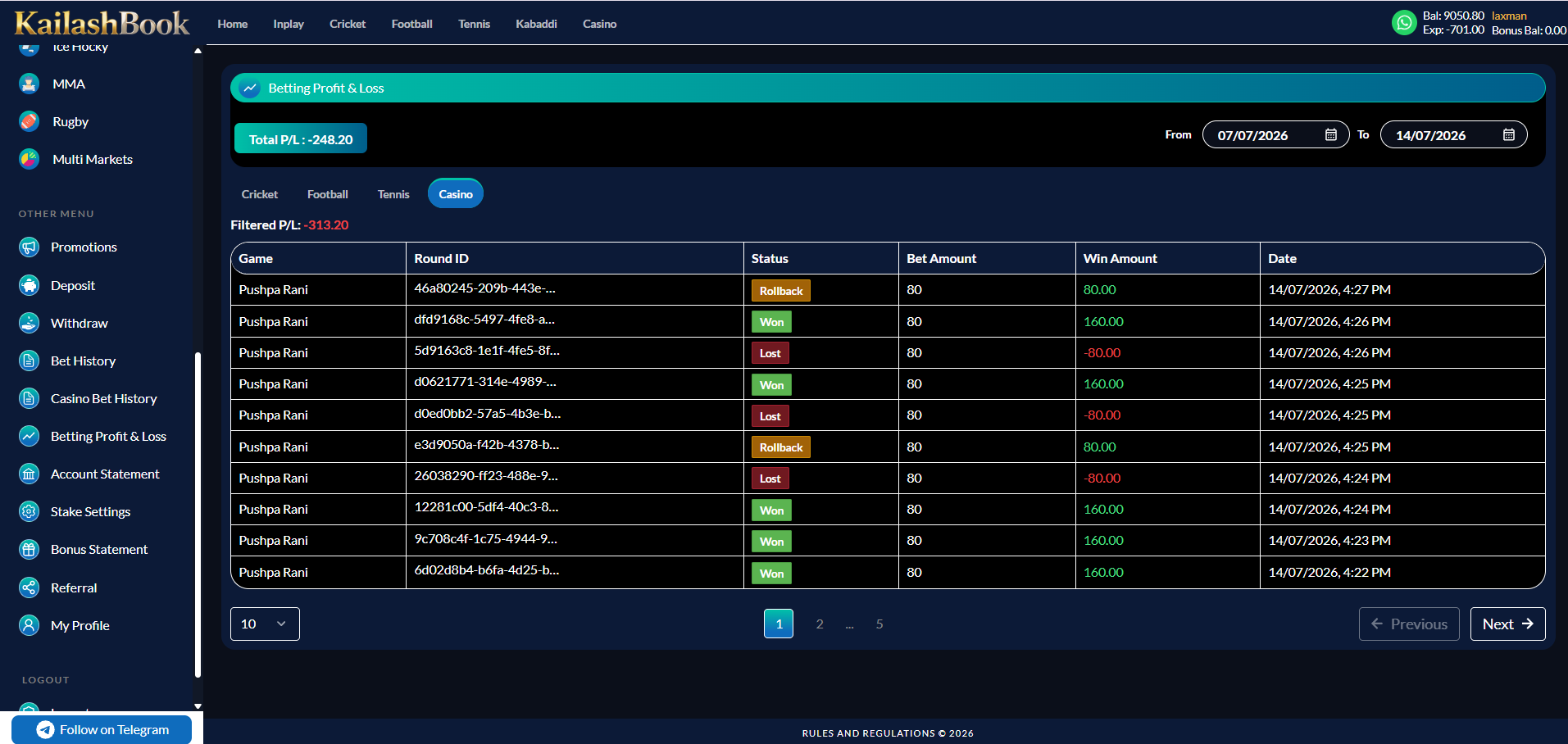
A market-wise settled profit/loss report, filterable by sport (including Casino) and date range.
Features included
| Total P/L summary chip | Included |
| Sport tabs: Cricket / Football / Tennis / Casino | Included |
| Filtered P/L per selected tab, From / To date filter | Included |
| Sports columns: Event, Market, Selection, Settle Time, Net | Included |
| Casino columns: Game, Round ID, Status, Bet Amount, Win Amount, Date | Included |
| Pagination | Included |
Module 17
Account Statement
›
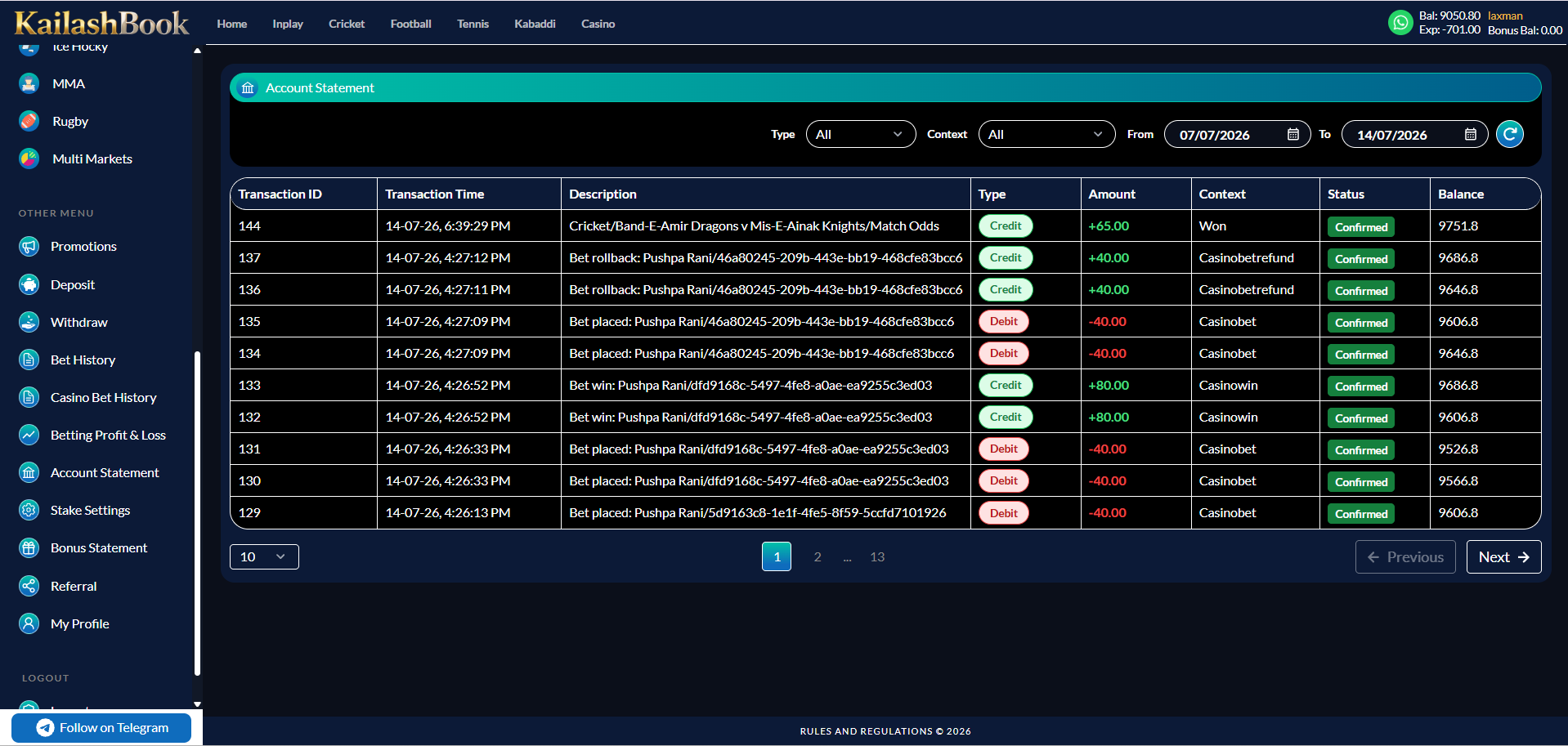
A full ledger of every wallet-affecting event — deposits, withdrawals, bet debits/credits, bonus movements.
Features included
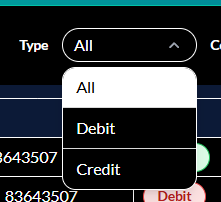
| Type filter (All / Debit / Credit) | Included |
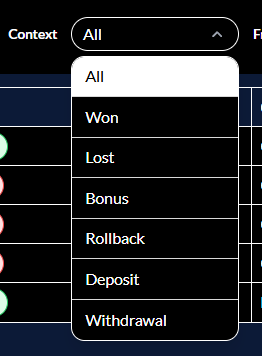
| Context filter (All / Won / Lost / Bonus / Rollback / Deposit / Withdrawal) | Included |
| From / To date filter + refresh | Included |
| Columns: Transaction ID, Transaction Time, Description, Type, Amount, Context, Status, Balance | Included |
| Pagination | Included |
Module 18
Stake Settings
›
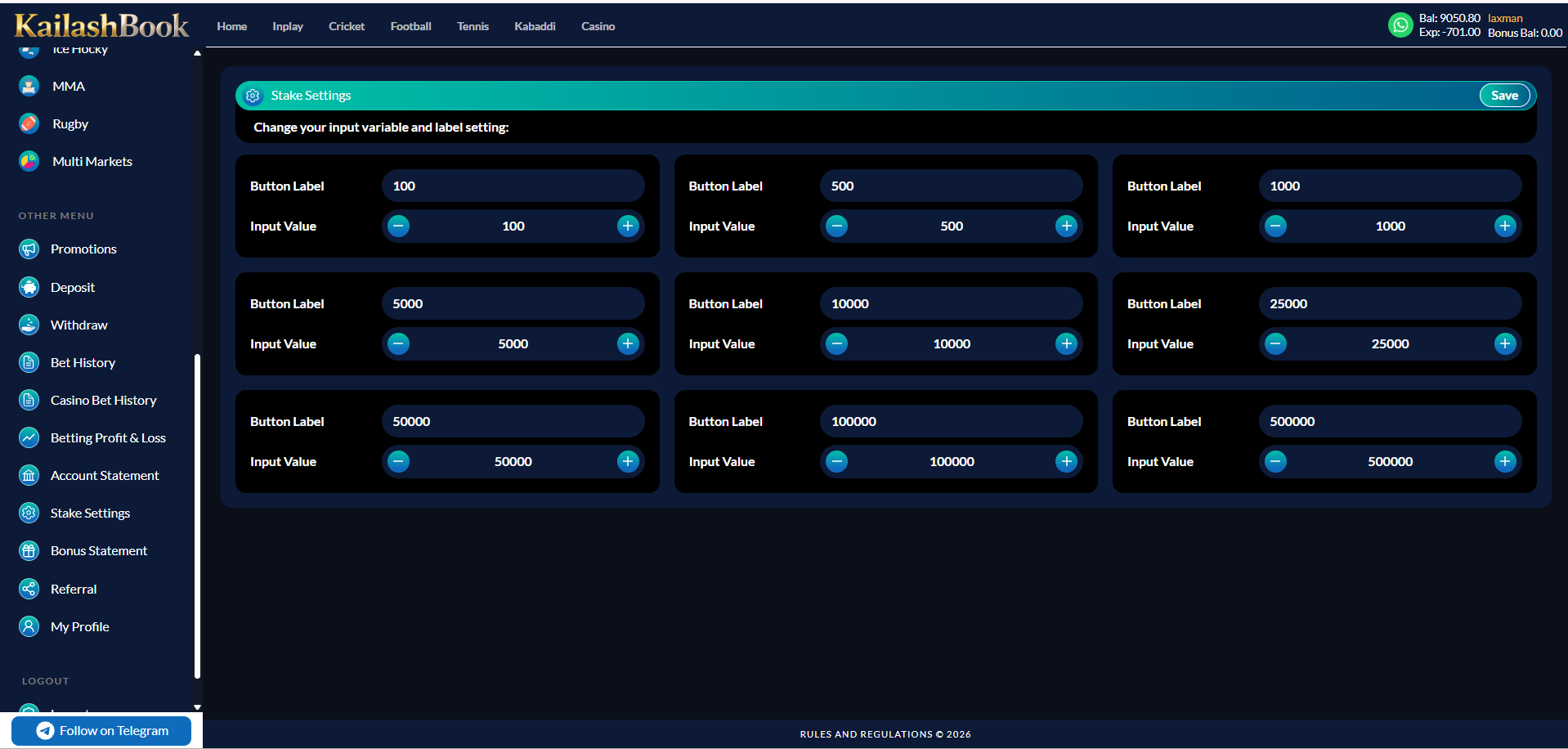
Lets a user customise the label and value of the 9 quick-stake buttons shown in the Bet Slip.
Features included
| 9 Button Label fields | Included |
| 9 Input Value steppers (+ / −) | Included |
| Save button | Included |
Business rules
- Default values are 100 / 500 / 1,000 / 5,000 / 10,000 / 25,000 / 50,000 / 100,000 / 500,000.
- Saved values immediately reflect in the Bet Slip's quick-stake chips.
Module 19
Bonus Statement
›
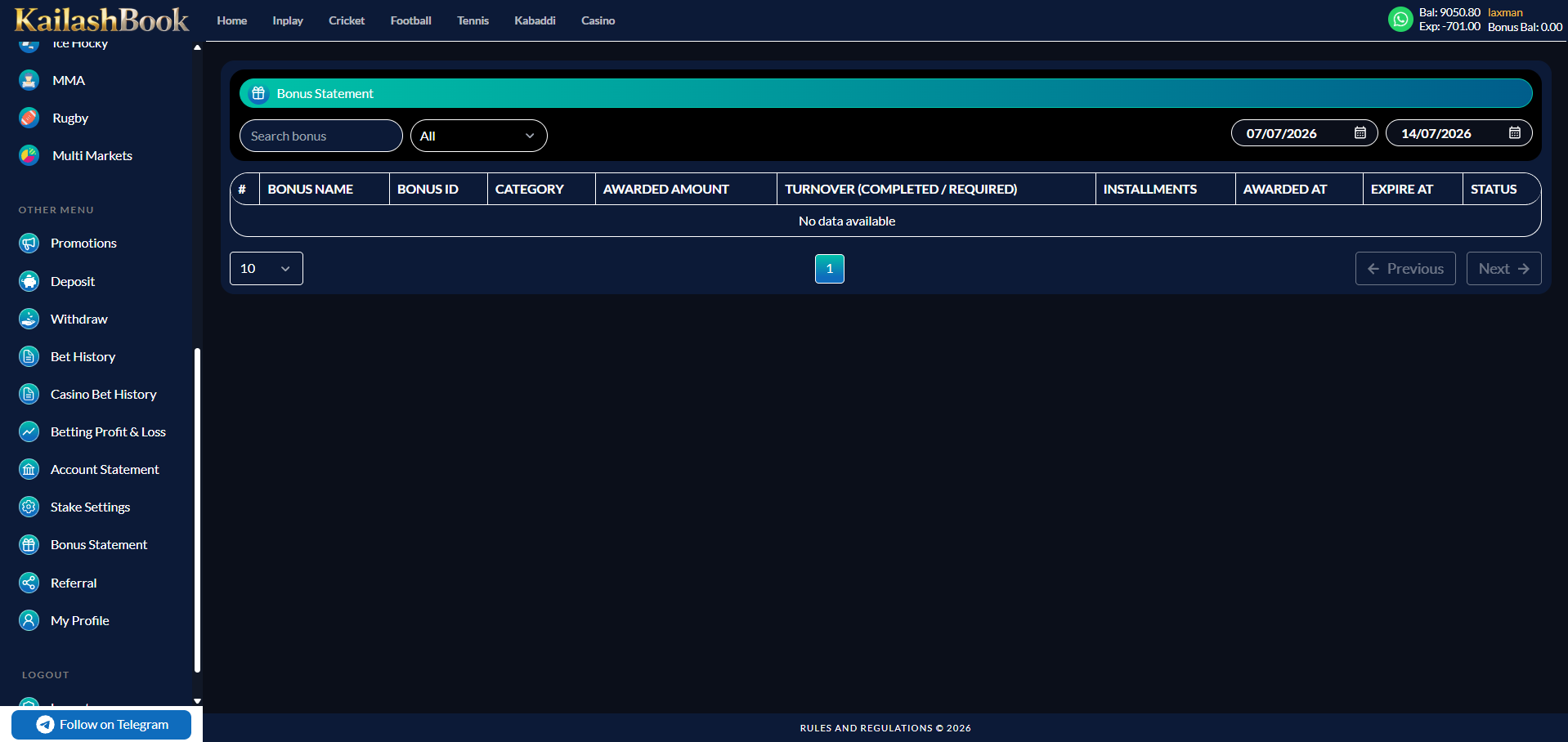
A dedicated ledger of every bonus the user has been awarded. Bonus types, policies and turnover rules will be documented in a dedicated Bonus module once shared by the client.
Features included
| Search bonus box | Included |
| Category filter (All / …) | Included |
| From / To date filter | Included |
| Columns: #, Bonus Name, Bonus ID, Category, Awarded Amount, Turnover (Completed / Required), Installments, Awarded At, Expire At, Status | Included |
| Pagination, "No data available" empty state | Included |
Module 20
Referral
›
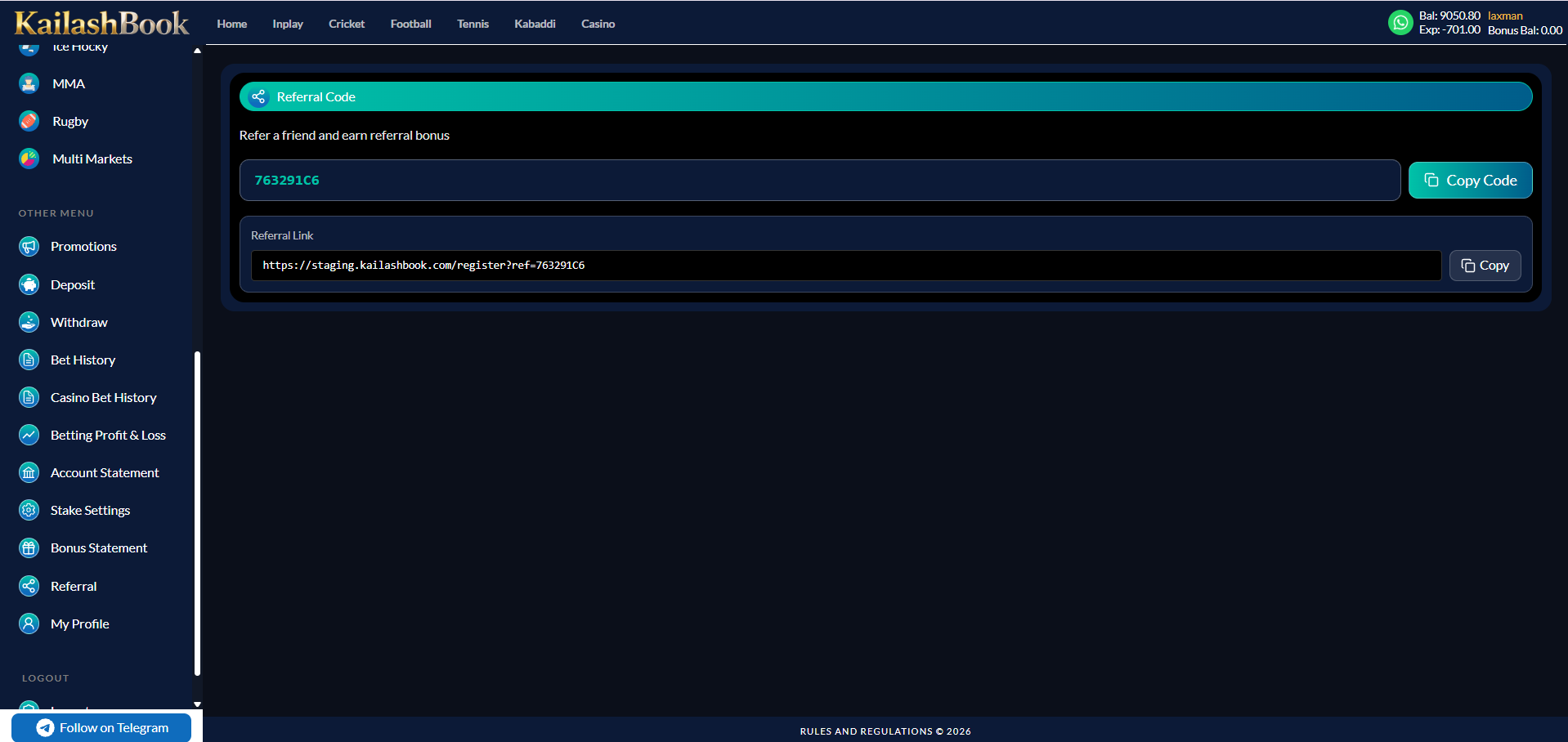
Gives every user a personal referral code and shareable link to invite new players.
Features included
| Unique referral code + Copy Code button | Included |
| Referral link (prefilled register URL with ?ref= code) + Copy button | Included |
Business rules
- Referral code is generated automatically on account creation and cannot be edited.
- New users signing up via the link or entering the code manually are attributed to the referrer.
- Referral bonus crediting is covered in the Bonus module once shared by the client.
Module 21
My Profile
›
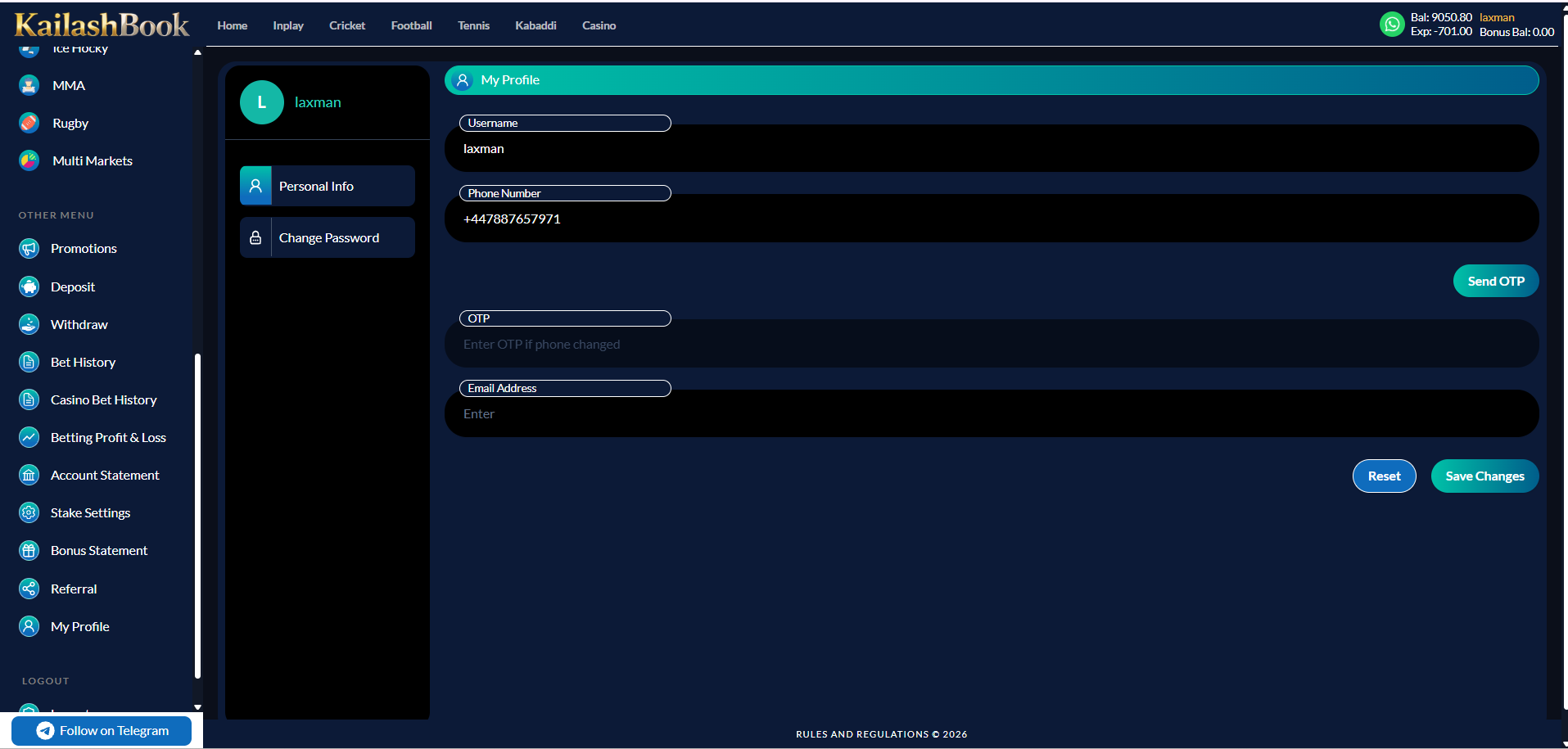
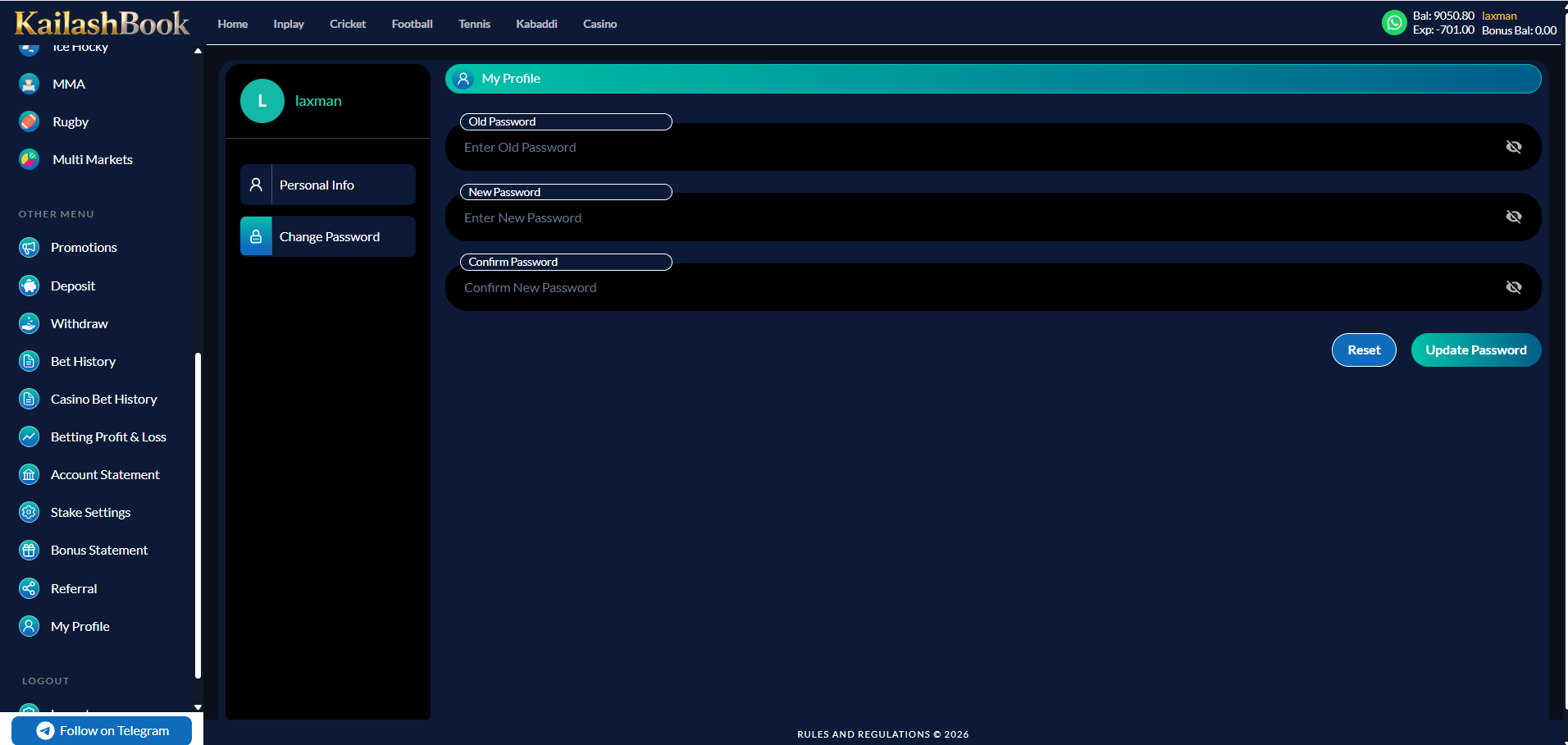
Lets a user view and update their personal details, and change their password.
Features included
| Personal Info / Change Password tabs | Included |
| Username (read-only), Phone Number with OTP re-verification on change | Included |
| Email Address (optional) | Optional |
| Reset / Save Changes buttons | Included |
| Old / New / Confirm Password fields (show / hide), Update Password button | Included |
Business rules
- Username cannot be changed once set.
- Changing the phone number requires OTP verification of the new number.
Module 22
Logout & Support
›
Persistent utilities available on every page.
Features included
| Logout — sidebar item, ends the session and returns to Sign In | Included |
| "Follow on Telegram" button — pinned bottom of sidebar, opens the platform's Telegram channel | Included |
| WhatsApp support icon — header, opens support chat | Included |
C Client Sign-off
By signing below, the client confirms that the modules described in this document represent the agreed scope for the current development phase. Promotions (Module 11, screenshots pending) and the full Bonus policy module remain open items. Any feature not listed is out of scope and subject to a Change Request.
| Name | Role | Signature | Date |
|---|---|---|---|
| Client | |||
| Innosoft Group |